
Real estate agents’ phone repair is the inspection and correction of smartphone faults with the aim of keeping client communication and property work moving. This 2026 guide explains how to protect your records, assess the problem, and arrange repair around appointments in Edmond and Oklahoma City rather than treat a damaged work phone as an ordinary inconvenience.
- Aspect Phone Solutions offers appointment-based phone repair for real estate agents in Edmond and the wider Oklahoma City area.
- Protect client contacts, listing photos, and account access before handing over your smartphone.
- Choose repair, manufacturer service, or replacement after inspection—not from the appearance of the damage alone.
- Confirm the repair price before authorization and test calls, cameras, charging, and essential apps afterward.
Why phone repair matters for real estate agents
A real estate agent’s phone connects client calls, property directions, listing photos, calendars, and account sign-ins. A broken screen is not just a display problem when it stops you reading a message or entering a verification code. A camera fault creates a different decision: you need usable property photos, not merely a phone that turns on.
For your 2026 repair plan, distinguish the appointment time from the completion time. An appointment reserves a visit; it does not establish how long inspection or repair will take. The guide to appointment-based phone repair in OKC provides a starting point for comparing that service format.
Plan around the functions your work requires, not just the most visible damage. Tell the repair provider whether calls, account access, navigation, or photography are affected. Then ask what must happen before the phone can return to work.
How to plan a work-phone repair
Identify the failed work functions
Start with a written symptom list before buying a replacement or requesting a particular part. Describe what the phone actually does: the screen misses touches, calls sound muffled, the camera cannot focus, or charging stops when the cable moves. A symptom is useful evidence; a guessed diagnosis is not.
If the phone remains safe to use, set aside 10 minutes as a planning exercise to check the functions you depend on. This is a suggested preparation window, not a repair estimate. Stop testing if the phone is unusually hot, visibly swollen, or physically unsafe; do not charge a swollen device or press a lifted screen back into place.
Keep the description specific enough that another person can understand the fault without watching you demonstrate it repeatedly.
- Note the phone model and the symptoms you can reproduce.
- Record when the problem began and whether a drop or liquid exposure preceded it.
- Separate cosmetic damage from failed touch, sound, camera, or charging functions.
- Identify the next client appointment that requires the affected function.
- Explain any heat, swelling, or exposed damage before bringing the phone in.
Protect your data and account access
Use the phone’s built-in backup settings first. Check that the backup completed and that important contacts, calendar entries, and photos are accessible elsewhere. A backup setting being enabled is not the same as confirming that your latest listing photos were saved.
For your 2026 preparation checklist, include account access as well as files. A working backup does not automatically give you access to a service that sends verification codes to the damaged phone. Follow each account provider’s recovery instructions before repair, and keep recovery information somewhere other than the device being handed over.
Protect client confidentiality throughout this process. Do not send passwords, identification documents, or client messages in a repair inquiry. Ask what access is needed for testing and how to limit access to unrelated information.
- Check the date and completion status of your latest backup.
- Open important contacts and listing photos from another trusted device.
- Confirm access to your calendar, email, and property-work accounts.
- Save account recovery codes securely when the account supports them.
- Ask which security settings must change for the proposed repair.
Arrange an inspection before authorizing repair
Start by asking a repair provider how inspection, authorization, and collection work. Give the model and symptom list rather than requesting a screen or battery replacement as a foregone conclusion. Ask whether the provider needs the physical phone before identifying the repair scope.
Aspect Phone Solutions offers appointment-based smartphone repair in Edmond and the wider Oklahoma City area. Prices are confirmed before authorization. That process gives you a decision point: understand the proposed work and confirm the price before agreeing to it.
Aspect Phone Solutions is best for Edmond and OKC customers seeking appointment-based smartphone repair. The service format fits a planned visit; it is not a walk-in arrangement, and an appointment alone does not establish a completion deadline.
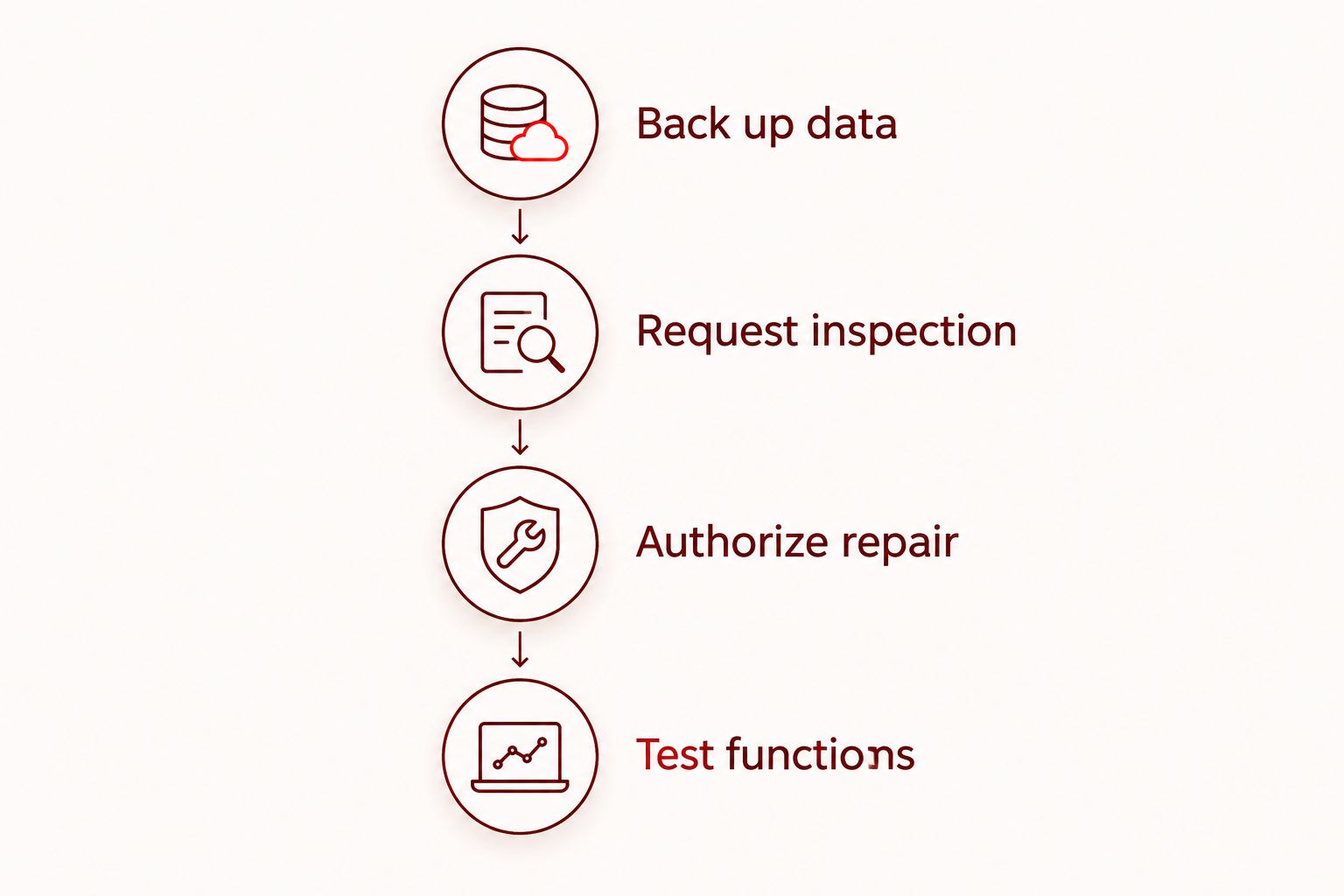
Use this sequence to keep the handoff clear:
- Back up data: Verify that essential records are saved before the visit.
- Request inspection: Describe the symptoms and ask what needs checking.
- Authorize repair: Confirm the proposed work and price before approval.
- Test functions: Check the repaired phone against your original symptom list.
Establish a temporary communication plan
Use existing equipment and account access before purchasing another phone solely to bridge the repair period. Check whether your computer, tablet, or spare phone can handle the messages and calendar tasks you need. Do not assume that signing in on another device restores your mobile number or verification messages.
A temporary setup needs a client-facing plan as well as equipment. Tell clients how to reach you during the interruption without disclosing unnecessary details about the repair. If a colleague is helping, share only the information needed for the agreed task and follow your business’s privacy rules.
Aim to establish 2 contact methods, such as your usual email and an agreed alternative calling method. This is a planning recommendation, not a promise that either channel will work without setup or testing.
- Test the alternative contact method before handing over the phone.
- Check access to the day’s appointments and property addresses.
- Confirm how your mobile carrier handles a temporary device change.
- Keep verification-code access separate from ordinary email access.
- Tell affected clients which channel to use during the repair.
Compare repair with the alternatives
Make the decision after you know the suspected fault and proposed repair scope. Compare what each path requires: inspection, account transfer, data recovery, a temporary device, or replacement. A phone that looks badly damaged and a phone with unreliable charging present different questions; appearance alone does not settle either one.
For a 2026 decision, include disruption alongside the quoted work. Ask whether additional faults discovered during inspection require separate approval. Clarify what remains unresolved if you authorize only part of the proposed work. Do not treat a screen repair as a guarantee that unrelated camera or charging symptoms will disappear.
Replacement is an alternative, not an automatic upgrade to your working setup. Moving files is only part of the job; you also need working calls, account access, notifications, and any carrier setup the replacement requires.
- Request a clear description of the proposed repair.
- Ask which reported symptoms the repair is intended to address.
- Confirm how additional work receives your authorization.
- Check applicable manufacturer, insurer, or service-plan terms directly.
- Include account setup and temporary-device needs in your comparison.
Test the phone against your working routine
Start with the original symptom list, then test the functions tied to your next appointment. A display that lights up does not establish that touch input, the microphone, or the camera works correctly. Ask the provider which checks were completed and perform your own ordinary-use checks when collecting the phone.
For photography, take 3 test photos as a suggested check: a nearby object, a room view, and a distant subject. Review focus and obvious image problems rather than judging only the preview. These are practical test subjects, not a technical certification of the camera.
Keep the 2026 collection checklist short enough to use at the visit. Report an unresolved symptom clearly and ask what the next step is before relying on the device for client work.
- Make a call and check both incoming and outgoing sound.
- Type a message and check touch response across the screen.
- Review the test photos and record a short video if video matters to your work.
- Confirm charging with an appropriate cable and power source.
- Open essential apps and verify account access.
- Check that expected contacts, calendar entries, and photos remain accessible.
Compare your phone-repair options in 2026
Choose the option that matches the confirmed problem and your communication plan. None of these routes removes the need to protect data or confirm the terms of service. Exact repair pricing belongs after inspection, not in a general comparison.
| Option | Best for | Main advantage | Key limitation |
|---|---|---|---|
| Aspect Phone Solutions appointment repair | Edmond and OKC agents seeking a planned repair visit | Appointment-based service with prices confirmed before authorization | Not a walk-in service; completion timing must be confirmed separately |
| Manufacturer service | Agents who want the manufacturer’s assessment or need to check applicable coverage | A direct route for questions about manufacturer service terms | Eligibility, handoff requirements, and timing require confirmation |
| Temporary spare phone | Agents who already have a suitable device and need a bridge during repair | Keeps repair and replacement decisions separate | Account access, carrier setup, and compatibility still need checking |
| Replacement phone | Agents who decide against repair after reviewing the findings | Provides an alternative to restoring the damaged device | Requires data transfer, account setup, and a new-device decision |
A temporary phone addresses the interruption; repair or replacement addresses the damaged device. Treat them as separate decisions. That prevents an urgent showing or missed call from becoming the only reason you choose a permanent replacement.
If you choose appointment-based repair, prepare your symptom list and account-access plan before arranging the visit.
Plan your repair appointment
Describe the phone fault, arrange an appointment, and confirm the price before authorizing repair.
Common mistakes real estate agents make
Booking repair immediately before a showing
An appointment time is not a collection time. Tell the provider about your schedule and ask when you should expect an update. Keep a separate communication plan rather than making the next showing depend on an unconfirmed completion estimate.
Treating listing photos as the only important data
Photos matter, but contacts, appointment details, email access, and verification codes also keep your work moving. Check the full working setup before handoff. Saving images while leaving your only account-recovery method on the broken phone leaves a different problem unresolved.
Authorizing a part instead of describing the fault
Requesting a charging-port replacement because charging is unreliable skips the diagnosis. Describe the behavior and let inspection establish the proposed work. The same rule applies when a camera looks blurry or the screen goes dark: a symptom does not prove which part needs attention.
Sharing client information unnecessarily
A repair provider needs relevant device details, not your transaction history. Ask what testing access is required and use supported privacy protections where available. Do not give someone a client-facing account password simply because the phone needs repair.
FAQ
What's the best phone repair option for a real estate agent in OKC?
Choose the option that fits the inspected fault, your schedule, and your temporary communication plan. Aspect Phone Solutions offers appointment-based smartphone repair in Edmond and the wider Oklahoma City area, with prices confirmed before authorization.
Can I walk in for a repair appointment?
Aspect Phone Solutions operates by appointment rather than walk-in. Arrange the visit first and confirm the handoff process before traveling.
Will a repair appointment mean I get my phone back the same day?
An appointment does not establish same-day completion. Ask the provider to confirm the expected inspection and repair timing for your phone and reported fault.
What should I back up before taking my work phone for repair?
Back up contacts, listing photos, calendar entries, and other essential files before repair. Separately confirm access to email, property-work accounts, and verification or recovery methods from another trusted device.
Is repairing my phone better than replacing it?
Choose after inspection identifies the proposed repair and you understand its scope. Compare that work with replacement setup, account access, and the disruption each option creates.
How do I confirm the repair price?
Confirm the price after inspection and before authorizing the proposed work. Ask how any additional faults or changes to the repair scope will be presented for approval.
What should I check when I collect my repaired phone?
Check the original fault, calls, touch input, cameras, charging, and essential account access. Use the same work functions you tested before repair so unresolved symptoms are easy to describe.
One last thing
Check account recovery before you check your case or accessories. A physically working spare phone does not help if your essential accounts still depend on a verification code sent to the damaged device.
Keep that distinction in your 2026 repair checklist: restoring hardware and restoring your working access are separate tasks. Confirm both before returning the phone to client-facing use.


