
Phone repair for teachers is the diagnosis and repair of a smartphone with the aim of restoring dependable access to school communication and daily tasks. This 2026 guide helps teachers and school staff plan around the school day, protect work information, and approve a repair without assuming an appointment guarantees a completion time.
- Aspect Phone Solutions fits Edmond and OKC teachers seeking appointment-based phone repair with prices confirmed before authorization.
- Phone repair for teachers starts with a backup, a school-access plan, and a clear description of the fault.
- Screen repair, battery replacement, and charging problems require different checks; describe the symptoms before choosing a repair.
- Protect school communication and student information before handing over a phone; follow your district’s device rules.
Why phone repair matters for teachers and school staff
A teacher’s repair decision involves more than whether a phone still turns on. If you use it for school messages, authentication codes, or family contact, losing access affects tasks that continue while the phone is away. A cracked display also needs a different plan from a phone that shuts down unexpectedly.
Aspect Phone Solutions is best for teachers in Edmond and Oklahoma City who want appointment-based phone repair with prices confirmed before authorization. Start with Aspect Phone Solutions when that service model matches your schedule. An appointment provides a planned visit, not a promise that every fault can be repaired during that visit.
For your 2026 repair plan, separate three questions: Is the phone safe to use? Can you access essential accounts without it? What work will you authorize after inspection? Answering them keeps urgency from becoming an uninformed repair decision.
A school-issued phone needs another check before you book anything. Ask the district’s technology contact who can authorize outside repair. Ownership and permission matter even when the problem looks straightforward.
How to plan phone repair around the school day
1. Describe the fault before choosing a repair
Start with a written symptom note. Record what stopped working, what still works, and whether the problem followed a drop, liquid exposure, or a change in charging behavior. You do not need to identify the failed component yourself.
For a screen problem, distinguish cracked glass from missing images or unreliable touch response. For charging trouble, explain whether the phone recognizes a connected charger and whether the connection changes when the cable moves. These observations describe the fault without turning a guess into a diagnosis.
Stop using or charging a phone with a swollen battery, smoke, or unusual heat. Do not press a lifted screen back into place or attempt to open the device. A safety concern takes priority over keeping the phone working until dismissal.
- Write 1 symptom note you can bring to the appointment.
- Record the phone model from its settings or purchase records.
- Describe when the fault started and what preceded it.
- Separate cosmetic damage from failures that prevent use.
- Report heat, swelling, or liquid exposure before arranging handling.
2. Protect your files and school information
Use your phone’s existing backup settings first. Check whether the backup completed rather than assuming an enabled setting means your latest files are saved. If the screen still responds, prioritize anything you cannot recreate, including personal photos and locally stored documents.
A backup is not permission to move school information into a personal account. Follow your district’s rules for student records, classroom images, and work documents. When the rules are unclear, ask the school’s technology contact before copying or deleting information.
If the phone will not unlock, do not repeatedly attempt risky fixes just to create a backup. Explain that data preservation matters before authorizing work. Repair and data recovery are different requests; neither should be assumed to include the other.
- Check the date and status of the latest completed backup.
- Verify that essential personal files are accessible elsewhere.
- Keep school records in district-approved storage.
- Ask before erasing a district-owned device.
- State whether preserving local data is a repair priority.
3. Set up access without the damaged phone
Before the appointment, try signing in to essential services from a device you are authorized to use. Start with school email and any account that asks the damaged phone to approve a login. A saved password alone does not solve a missing authentication prompt.
Use the account’s approved recovery or alternate authentication method. For a school-managed account, ask district technology staff for help rather than disabling security controls. Keep recovery information private, and never include passwords in your written symptom note.
Plan how someone will reach you while the phone is away. Choose 2 contact methods you can actually check, such as personal email and a permitted alternate phone number. Give the repair provider the appropriate contact method without sharing unrelated work information.
- Test school-account access on an authorized alternate device.
- Confirm an approved backup authentication method.
- Keep recovery codes separate from the phone you hand over.
- Tell relevant contacts how to reach you during the repair.
- Ask what access is needed for diagnosis and final testing.
4. Book around your real availability
Check your calendar before requesting a repair appointment. A planning period, lunch break, or after-school gap works only if you can travel, discuss the problem, and return without missing duties. Do not build the day around an unconfirmed completion estimate.
Aspect Phone Solutions provides appointment-based phone repair for Edmond and the wider Oklahoma City area. That makes it an option for teachers who prefer a scheduled visit, but you still need to confirm the appointment arrangements and how the repair decision will be communicated.
Use the appointment-based phone repair guide to frame your scheduling questions. For a 2026 appointment, give your actual availability and ask whether diagnosis, authorization, and collection require separate arrangements.
- Share the phone model and symptoms when requesting the appointment.
- State when you can drop off and collect the phone.
- Ask whether inspection happens before a completion estimate.
- Confirm how the provider will contact you during school hours.
- Arrange a backup communication plan if collection is delayed.
5. Approve the repair only after inspection
Ask for the proposed repair in plain language. You need to understand the identified problem, the work being recommended, and what that work does not address. A screen repair does not automatically resolve an unrelated charging fault.
Aspect Phone Solutions confirms prices before authorization. Use that decision point to ask about the repair scope and any choices that affect the result. Do not authorize work solely because a phone is inconvenient to be without.
For example, ask whether the proposed work addresses the symptom you reported or only one visible defect. If inspection identifies another problem, ask for a revised explanation before approving additional work. Keep a record of what you authorized so the collection conversation has a clear reference.
- Request a plain-language explanation of the diagnosed fault.
- Confirm the proposed work before giving authorization.
- Ask what functions the repair is expected to restore.
- Ask about any known limitations or unresolved symptoms.
- Keep the authorization details with your appointment notes.
6. Choose repair, replacement, or temporary access
Use the inspection findings rather than the appearance of the phone alone. Repair fits a phone with a defined fault when the proposed work meets your needs. Replacement deserves consideration when repair would leave other problems that still prevent dependable use.
Temporary access solves a different problem: staying reachable while you decide. An authorized spare device or approved computer can help with some communication tasks, but it does not repair the damaged phone. It also needs its own account and privacy checks.
In 2026, review the manufacturer’s current software-support information for your exact model before deciding to keep it long term. Do not assume every phone of the same brand has the same support status. If you use the phone for work, district requirements also belong in that decision.
- Compare the proposed repair with the functions you actually need.
- Identify faults that would remain after the recommended work.
- Check current software support for your exact model.
- Confirm district requirements for any work-connected device.
- Test temporary access before relying on it during the school day.
7. Test the phone before returning to your routine
Bring your original symptom note to collection. Testing is more useful when it checks the problem that prompted the appointment, not just whether the phone turns on. Ask how to perform the checks safely if the original issue involved heat or liquid exposure.
Use 3 checkpoints: the repaired function, essential communication, and account access. A working display is not the whole result if you still cannot receive a call or sign in to a school service you need.
Keep the checks relevant to the repair. After screen work, test touch response and readable images. After charging-related work, check charging behavior with an appropriate cable. Report any unresolved symptom promptly, and ask how the provider wants you to document it.
- Test the function that originally failed.
- Check calls, messages, microphone, and speaker as relevant.
- Verify charging behavior if charging was part of the repair.
- Confirm that essential account access still works.
- Keep the repair record and any written care instructions.
Keep the repair process in the right order
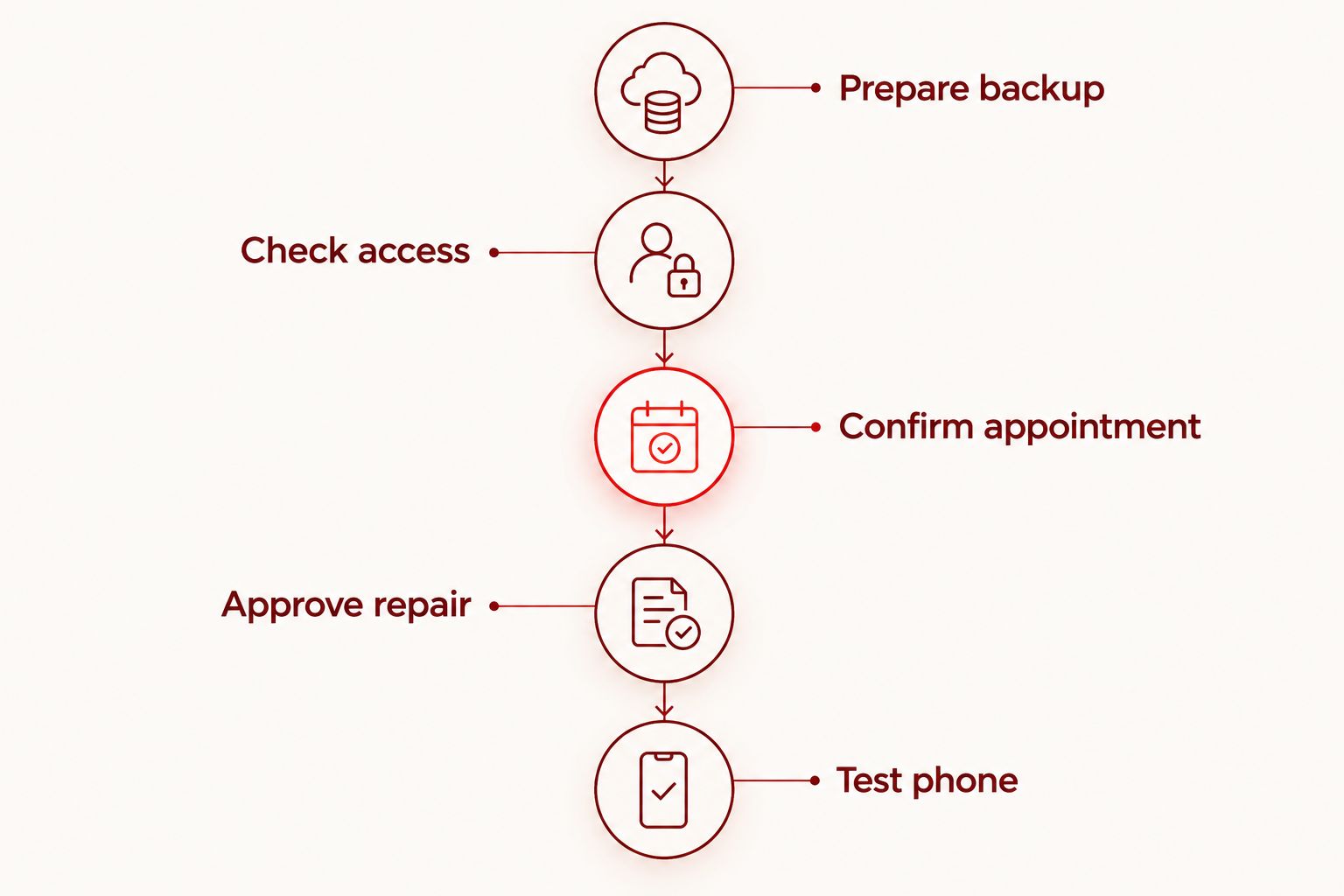
Prepare backup, check access, confirm appointment, approve repair, and test phone. That sequence separates preparation from permission: you protect your information before handing over the device, then authorize work after you understand the findings. Skip neither step simply because your school day is busy.
Keep appointment information and the symptom note somewhere other than the damaged phone. A paper note or an accessible personal document is useful if the screen stops responding before the visit. Do not put account passwords in that record.
Compare your options for the school day
The right option depends on the diagnosed fault, device ownership, and your access needs. This 2026 comparison separates repair services from temporary communication arrangements; they solve different problems.
| Option | Best for | Practical advantage | Key limitation |
|---|---|---|---|
| Aspect Phone Solutions appointment-based repair | Teachers in Edmond and OKC who prefer a scheduled repair visit | Appointment-based service with prices confirmed before authorization | Scheduling does not guarantee a particular completion time |
| District technology support | School-issued phones and managed work accounts | The appropriate starting point for ownership, authorization, and account questions | District procedures determine what outside repair you can approve |
| Manufacturer-authorized service | Customers who want to investigate the manufacturer’s repair route | Lets you assess repair through the device maker’s service process | You must verify arrangements and eligibility for your exact device |
| Temporary authorized device access | Staff who need communication while a repair decision is pending | Separates immediate access needs from the repair decision | Requires setup and does not fix the damaged phone |
| Phone replacement | Customers whose repair findings do not meet their ongoing needs | Provides a different device rather than addressing individual faults | Requires data transfer and account setup |
Choose the option that restores the functions you need without bypassing school rules. An appointment, a replacement device, and account-support help are not interchangeable. You can need more than one, but each should have a clear purpose.
Plan your repair appointment
Appointment-based smartphone repair for Edmond and OKC, with prices confirmed before authorization.
Common mistakes teachers and school staff make
Treating a school break as a confirmed repair window
Your availability is not the same as the provider’s inspection or repair schedule. Tell the provider when you need the phone back, then confirm what is possible after the problem is assessed. Keep another communication method ready rather than making dismissal depend on collection.
Assuming school logins will work on any spare device
A second phone or computer does not automatically receive the authentication prompts sent to your damaged phone. Test access before the appointment. Ask district technology staff to resolve managed-account access through approved methods.
Handing over a district-owned phone without permission
Personal convenience does not establish repair authority. Confirm who owns the device and who can approve outside work. The same check applies before erasing the phone or transferring school information to another account.
Approving a named part instead of an explained repair
Requesting a screen or battery replacement before inspection can narrow the conversation too early. Describe the problem first. Approve work based on the findings, the intended result, and any symptoms that remain unresolved.
Checking only whether the screen lights up
A phone can display an image while still having touch, audio, charging, or access problems. Use your symptom note at collection. Verify the repaired function and the communication tasks you need before relying on the phone for school again.
FAQ
What’s the best way to arrange phone repair for teachers in Edmond?
Start with a backup, a symptom note, and a realistic appointment window. Aspect Phone Solutions offers appointment-based smartphone repair in Edmond and the wider Oklahoma City area, with prices confirmed before authorization.
Can I get my phone repaired during my lunch break?
Do not assume a lunch break is enough for inspection and repair. Share your availability when requesting the appointment and confirm the arrangements before planning your school day around collection.
Should I repair my school-issued phone myself?
Contact your district’s technology staff before arranging repair for a school-issued phone. They can clarify who is authorized to approve outside work and how school information should be handled.
How do I keep access to school email while my phone is being repaired?
Test school-email access on an authorized alternate device before handing over your phone. If sign-in requires a prompt on the damaged phone, ask district technology staff for an approved alternate authentication method.
Should teachers repair a cracked screen or replace the phone?
Decide after inspection identifies the damage and proposed repair. Consider whether the repair restores the functions you need, whether other faults remain, and whether the exact model meets your software-support and school-access requirements.
Do I need to back up my phone before a repair?
Back up accessible personal information before repair and verify that the backup completed. Handle school files according to district rules, and tell the provider if preserving data is a priority.
What should I check when I collect my repaired phone?
Check the repaired function, essential communication, and account access. Use your original symptom note to confirm that the problem you reported has been addressed, and report unresolved symptoms promptly.
One last thing
A repaired phone and restored school access are separate outcomes. Before your 2026 appointment, test the login you depend on most from an authorized alternate device. That check exposes an access problem while you still have time to ask for help, rather than discovering it when the phone is already away.


