
Best starting point: Apple for manufacturer-led assessment. Best for an authorized local route: an Apple Authorized Service Provider. Best for comparing repair scope: an independent specialist that explicitly accepts your iPad model. For iPad battery replacement in Oklahoma City in 2026, choose the service route before choosing a shop—and confirm whether the proposed work replaces the battery or exchanges the device.
- For iPad battery replacement Oklahoma City, start with Apple when you want a manufacturer-led assessment.
- Apple Authorized Service Providers suit customers seeking an authorized service route; confirm iPad model acceptance before traveling.
- Independent tablet specialists suit repair-scope comparisons; ask who performs the work and what the written authorization covers.
- Aspect Phone Solutions offers appointment-based smartphone repair; confirm iPad service directly before arranging a visit.
Why this matters
A tablet that drains quickly does not automatically need a battery. Charging equipment, software activity, and other hardware faults can produce overlapping symptoms. Replacing a battery without identifying the problem risks leaving the original fault unresolved.
Aspect Phone Solutions offers appointment-based smartphone repair for Edmond and the wider Oklahoma City area. For an iPad inquiry, confirm that the specific tablet and requested work are accepted before making an appointment. Smartphone repair does not establish iPad repair capability.
This 2026 guide compares 3 service routes, not an unsupported leaderboard of local storefronts. The useful distinction is who handles your device, what work you authorize, and what happens to your data.
What makes the best iPad battery replacement service?
Use these criteria before you compare providers:
- Exact-model acceptance: The provider confirms your specific iPad, not simply “Apple devices.”
- Diagnosis before authorization: The assessment distinguishes battery deterioration from charging, software, or other hardware problems.
- Clear repair scope: You know whether the proposal involves a battery replacement, device exchange, or further diagnosis.
- Written terms: You receive the proposed work, total charge, and applicable repair terms before approving anything.
- Data and scheduling clarity: You understand backup requirements, device-access requests, drop-off arrangements, and collection procedures.
Do not choose by a verbal promise alone. A useful answer connects the proposed work to your symptoms and identifies what still needs inspection.
iPad battery replacement options at a glance
| Service route | Best for | Standout feature | Key limitation |
|---|---|---|---|
| Apple | Manufacturer-led assessment | Direct access to Apple's service process | The service outcome is not necessarily a battery-only repair |
| Apple Authorized Service Provider | An authorized service route through a separate provider | Apple-authorized service relationship | The specific location must confirm iPad acceptance and handling arrangements |
| Independent tablet specialist | Comparing a battery-only repair proposal | Opportunity to discuss the exact component-level scope | Authorization status, parts, and repair terms require separate verification |
The table separates service models rather than claiming that every provider follows the same procedure. For your 2026 decision, ask the actual location to confirm its process for your model.
1. Apple: best iPad battery service for manufacturer-led assessment
Apple is the best starting point when you want the manufacturer to assess an iPad battery complaint. Ask Apple to identify the service route for your exact model and explain what the proposed outcome involves.
Do not assume “battery service” means a technician will open your original iPad and return that same device with a new battery. Clarify whether the proposal involves repair or exchange before you authorize service, especially when local files matter.
Apple pros:
- You can discuss the problem directly through the manufacturer's service process.
- You can ask Apple to check applicable coverage against your device details.
- You can clarify manufacturer preparation instructions before handing over the iPad.
Apple cons:
- The proposed solution is not necessarily a battery-only repair.
- Manufacturer-led service does not remove the need to protect and back up your data.
Best for: Owners who want a manufacturer-led assessment before considering independent repair.
Give Apple a short description of the fault: whether the tablet shuts down unexpectedly, drains during light use, or fails to charge consistently. Ask how those symptoms affect the recommended service.
Verdict: Hold authorization until Apple confirms the diagnosis and whether your original device will return.
2. Apple Authorized Service Provider: best for an authorized service route
An Apple Authorized Service Provider is a separate business authorized to provide Apple service. This route suits customers who want an authorized process but prefer to discuss arrangements with a particular provider.
Confirm the exact location's current authorization and iPad acceptance before traveling from Edmond or elsewhere in OKC. A business handling some Apple products does not establish that it accepts every iPad model or performs every repair onsite.
Apple Authorized Service Provider pros:
- You can seek an authorized service process through a separate provider.
- You can clarify local intake and collection arrangements before visiting.
- You can ask whether the device stays onsite or follows another service route.
Apple Authorized Service Provider cons:
- You must verify the specific location rather than rely on a chain name.
- An authorized intake location does not automatically mean a battery-only repair happens there.
Best for: Customers who want an authorized route and need clear local handoff arrangements.
For a 2026 appointment, ask who performs the assessment, who communicates additional findings, and who returns the tablet. Those answers establish accountability if the initial request becomes a different repair proposal.
Verdict: Hold authorization until the location confirms your model, service scope, and device handling.
3. Independent tablet specialist: best for comparing repair scope
An independent tablet specialist is worth considering when you want to discuss a battery-only repair and compare that proposal with the manufacturer's route. Ask the business to confirm experience with your exact iPad model and explain what its inspection covers.
Independent service is not the same as Apple-authorized service. Evaluate the individual provider's answers, proposed parts, testing, and written terms rather than treating “independent” as either a guarantee or a warning.
Independent tablet specialist pros:
- You can ask directly whether the proposed work targets the battery alone.
- You can discuss other visible damage before deciding on the repair scope.
- You can request a clear explanation of post-repair charging and function checks.
Independent tablet specialist cons:
- Apple authorization must not be assumed.
- Parts descriptions and repair terms need direct confirmation from the business.
- A shop offering phone repair does not necessarily accept tablets.
Best for: Owners comparing a component-level repair proposal with other service routes.
For a local inquiry, contact Aspect Phone Solutions to confirm whether your iPad model and requested service are accepted. Its stated offering is appointment-based smartphone repair; do not arrange a tablet drop-off on that basis alone.
Verdict: Hold authorization until the specialist confirms model acceptance, diagnosis, and written repair terms.
Check these symptoms before requesting a battery replacement
Describe what the iPad actually does instead of opening with a diagnosis. “It shuts down while unplugged” gives a technician more useful information than “it needs a battery.”
Distinguish these 2 symptoms when you make your inquiry:
- Short runtime: The iPad charges but loses usable running time during ordinary use.
- Charging failure: The iPad does not charge reliably, or charging changes when you change the cable or adapter.
These symptoms can overlap, but they are not interchangeable. Tell the provider about recent drops, liquid exposure, unusual heat, and whether the problem began suddenly or developed gradually.
If the screen is lifting or the device appears swollen, stop using and charging it. Do not press the screen back down, puncture the device, or attempt to flatten it. Tell the service provider about the condition before arranging transport.
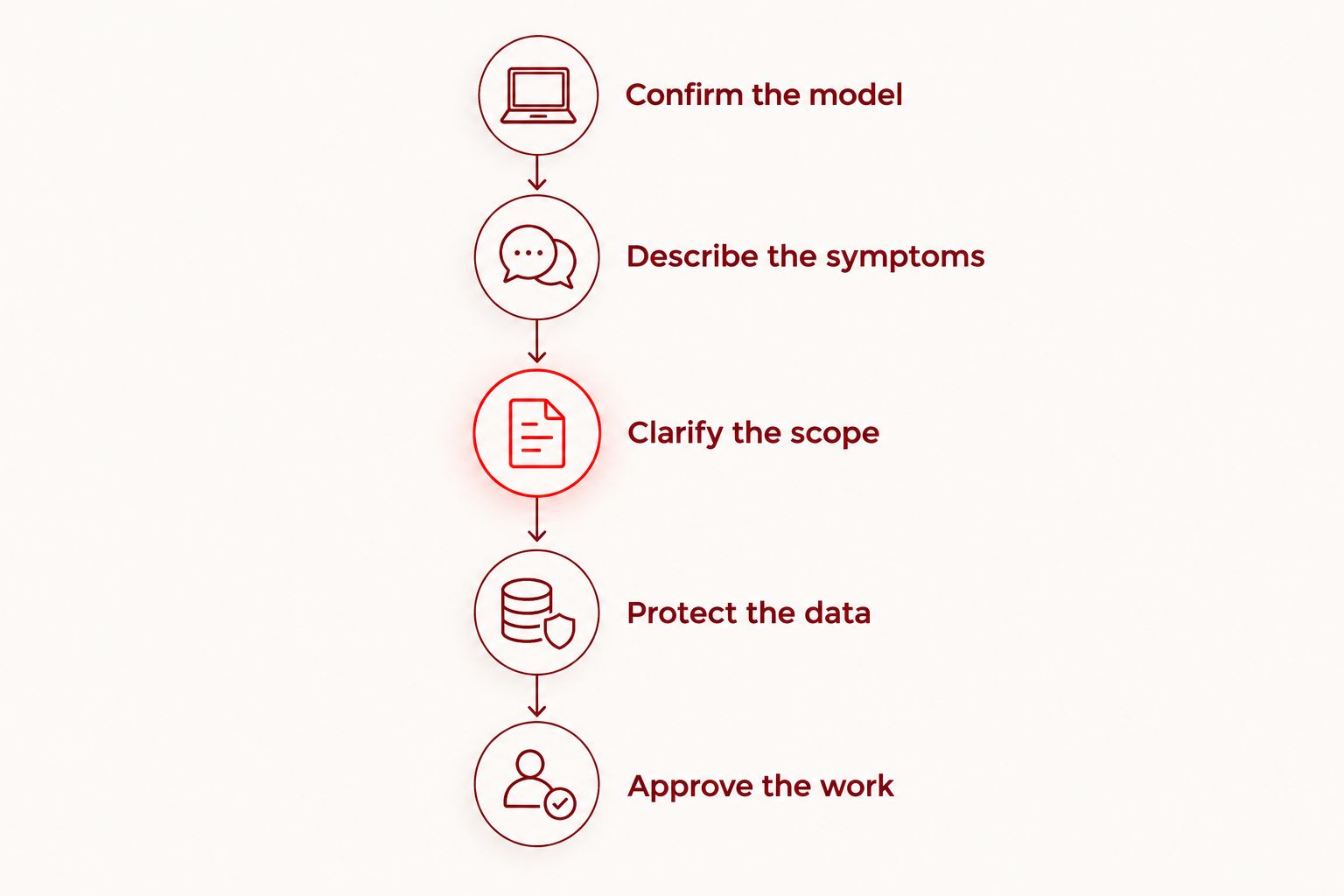
Ask these 5 questions before approving work
A useful service conversation ends with a defined decision, not simply an instruction to bring the tablet in. Use this sequence for a 2026 repair inquiry.
Confirm the model
Ask: Does this location accept my exact iPad model for battery assessment?
Find the model information in Settings if the device operates safely. If it does not, use your purchase records or identifying information on the device rather than repeatedly trying to power it on.
Describe the symptoms
Ask: Will the assessment check charging problems and other causes before recommending a battery?
Explain what happens while plugged in and unplugged. Mention whether the problem occurs across different apps or during a particular activity, without assuming that observation proves the cause.
Clarify the scope
Ask: Does the proposed service replace the battery in this iPad, exchange the device, or require another assessment?
Request an explanation of how existing screen or enclosure damage affects the work. Do not authorize unrelated repairs without understanding why they are necessary.
Protect the data
Ask: What preparation is required, and is device access needed for testing?
Back up the iPad before service when it is safe and functional. Confirm that important files are actually included, particularly documents stored inside individual apps. Never assume a repair appointment includes data recovery.
Approve the work
Ask: What exactly am I authorizing, and will you contact me before changing that scope?
Get the proposed work, charge, repair terms, and collection arrangements in writing. An appointment reserves a service interaction; it does not replace informed authorization.
Prepare for an Edmond or Oklahoma City service visit
Arrange the visit around confirmed instructions rather than assumptions about walk-in service. Ask where to bring the device, whether accessories are needed for diagnosis, and how you will receive updates.
Complete these 3 checks before leaving:
- Backup check: Verify that your important photos, documents, and app data are accessible somewhere other than the iPad.
- Device check: Record existing cracks, marks, and the symptoms you want assessed.
- Handoff check: Confirm the appointment, intake location, and method for approving additional work.
For a school- or employer-managed iPad, contact the organization before arranging independent service. Device ownership and management requirements affect who can authorize work and handle account settings.
Keep your account password private. Ask the provider to explain any device-access request, and follow official preparation instructions yourself rather than sharing account credentials.
How the service routes are ranked
The order prioritizes manufacturer-led assessment, then an authorized alternative, then independent repair-scope comparison. It follows the criteria above: model acceptance, diagnosis, authorization, data protection, and clear handling arrangements.
This is a decision order, not a claim about local customer reviews, repair speed, or workmanship. A provider earns your authorization through specific answers about your device—not through its position in a list.
Which iPad battery replacement service should you choose?
Start with Apple if you are undecided. Get a manufacturer-led assessment, understand the proposed outcome, and then compare an authorized provider or independent tablet specialist if the service route does not fit your needs.
For local smartphone repair, Aspect Phone Solutions is suited to Edmond and OKC customers who prefer appointment-based service and confirmation before authorization. For iPad battery replacement, verify tablet acceptance separately before planning a visit.
Your 2026 decision should rest on the same essentials whichever route you choose: a supported diagnosis, clear repair scope, protected data, and written authorization.
FAQ
What's the best starting point for iPad battery replacement in Oklahoma City?
Apple is the best starting point for a manufacturer-led assessment. Confirm the service route for your exact model and whether the proposed outcome is a repair or device exchange before authorizing work.
Does Aspect Phone Solutions replace iPad batteries?
Confirm iPad battery service directly with Aspect Phone Solutions before arranging a visit. Its stated service is appointment-based smartphone repair for Edmond and the wider Oklahoma City area.
Is an Apple Authorized Service Provider better than an independent shop?
An Apple Authorized Service Provider is the better fit when you specifically want an authorized service route. An independent tablet specialist is an alternative for comparing a component-level repair proposal, but model acceptance, parts, and terms need separate confirmation.
Does a fast-draining iPad definitely need a new battery?
Fast battery drain alone does not establish that an iPad needs a replacement battery. Software activity, charging problems, and other faults need assessment before you approve a repair.
Will iPad battery service erase my data?
Do not assume your data will remain accessible after service. Back up the iPad beforehand when safe, verify important files, and clarify whether the service involves exchanging the device.
Can I keep using an iPad if the screen is lifting?
Stop using and charging an iPad with a lifting screen or suspected battery swelling. Do not press the screen down or puncture the device; contact a service provider for safe handling instructions.
Can I walk into a repair shop with my iPad?
Confirm the provider's intake process before traveling. Some services require appointments, and a business accepting smartphones does not necessarily accept iPads.
One last thing
A successful battery repair must solve the symptom you brought in. At collection, ask what was replaced or exchanged, what checks were completed, and what to do if the original charging or shutdown problem returns. Keep the written service record with your device information.


