
The cost to fix a phone screen with lines depends on the exact phone model and whether the fault is in the display, its connection, or another component; an inspection is needed before an exact price is confirmed. For a repair decision in 2026, check whether the quote covers the complete repair, including any damage beyond the screen, before you authorize work.
- The cost to fix phone screen with lines depends on the model, diagnosis, and repair scope—not line color alone.
- Aspect Phone Solutions offers appointment-based smartphone repair for customers in Edmond and the wider Oklahoma City area.
- Back up accessible data before troubleshooting; persistent display lines need inspection rather than pressure or heat.
- Confirm the repair scope and price before authorization, especially when the phone also has frame or liquid damage.
How much does it cost to fix a phone screen with display lines?
A useful screen-repair quote starts with the cause of the lines, not just their appearance. A green stripe, flickering band, or group of horizontal lines describes a symptom. It does not establish which part needs repair.
For local service, use appointment booking rather than planning a walk-in visit. Share the phone model and explain when the lines first appeared.
The following comparison shows what different findings mean for the repair decision. These are possible repair paths, not diagnoses you can confirm from a photograph.
| Repair path | Best for | Main benefit | Main limitation |
|---|---|---|---|
| Software troubleshooting | Lines that appear only in a particular app or activity | Checks for a software-related cause before parts replacement | Does not repair a damaged display panel |
| Screen assembly replacement | A confirmed fault within the screen assembly | Replaces the faulty display components together | Does not address separate frame or circuit-board damage |
| Display connection repair | A confirmed connection fault | Targets the connection rather than assuming the screen is defective | Requires inspection; pressing the screen is not a diagnostic test |
| Further hardware diagnosis | Lines accompanied by other faults or unresolved display problems | Investigates causes beyond the screen | A screen-only quote does not describe the full repair scope |
Why this matters
Paying for the wrong repair leaves the original problem unresolved. The practical question is whether the proposed work addresses the diagnosed fault and whether the rest of the phone remains worth keeping.
In 2026, compare quotes for the same phone model and repair scope. A quote for replacing a screen is not directly comparable with one that also includes other damaged components.
When the phone needs a screen assembly replacement
A screen assembly contains more than the outer glass. Depending on the phone, it includes the display panel and touch-related components combined into a replacement unit.
Lines can appear even when the glass looks intact because the image-producing layer sits beneath it. Conversely, a cracked screen protector does not establish that the display underneath is damaged.
Ask whether the diagnosis points to the display panel or only the outer glass. A repair described as glass replacement does not necessarily address a fault in the image-producing layer.
Screen assembly replacement makes sense when inspection identifies the assembly as the cause. Its limitation is equally important: replacing the screen does not fix unrelated liquid damage, a distorted frame, or a fault elsewhere in the phone.
Before authorizing replacement, ask what screen will be fitted and what functions will be checked afterward. Include touch response, brightness adjustment, and any model-specific features you use regularly in that conversation.
When the display connection needs attention
A phone's screen connects to internal circuitry through cables and connectors. A fault along that connection can interfere with the displayed image, but the appearance of the lines alone does not prove a connection problem.
Tell the technician if the lines started after a drop, previous repair, or other physical event. That history helps guide inspection. It is not a reason to open the phone yourself.
Do not press, twist, or bend the phone to make the lines disappear. A temporary change under pressure does not establish a safe repair and risks adding damage.
Connection-focused repair is appropriate only when inspection supports it. Ask what finding distinguishes the connection fault from a damaged screen, and whether further work would require separate approval.
When the problem extends beyond the screen
Display lines deserve a broader inspection when the phone also restarts, fails to charge normally, shows signs of liquid exposure, or has a visibly distorted frame. Report each symptom separately rather than assuming everything comes from the screen.
A phone's main circuit board controls many functions, including communication with the display. A fault outside the screen can therefore require a different repair path.
The benefit of broader diagnosis is avoiding a screen replacement that does not solve the problem. The drawback is that the decision becomes more involved: you need to weigh the complete repair against the condition and usefulness of the phone.
Do not approve additional repairs solely because the screen work has already begun. Ask for an updated explanation and confirm the revised scope before authorizing further work.
Why the cost to fix a phone screen with lines varies
For a 2026 repair decision, these factors explain why a symptom alone cannot produce a dependable quote:
- Exact phone model: Screen assemblies and repair procedures differ by model. Give the full model name, not just the manufacturer.
- Confirmed fault: A defective panel, damaged connection, and circuit-board fault require different work. Line color is not enough to distinguish them.
- Replacement screen specification: Ask what part is proposed and how its display and touch features match your phone. Do not assume every replacement has the same characteristics.
- Frame condition: A bent or damaged frame affects how a replacement screen fits. Ask whether the frame needs attention before approving screen work.
- Liquid or impact damage: Damage beyond the display changes the repair scope. Explain the incident even if the phone continued working afterward.
- Other repairs you authorize: Keep screen work separate from unrelated concerns. An itemized explanation makes it easier to decide which work to approve.
Ask questions about any difference between an initial estimate and the inspected quote. The useful answer identifies the finding that changed the repair scope, rather than simply repeating that the phone is damaged.
What should you check before a repair appointment?
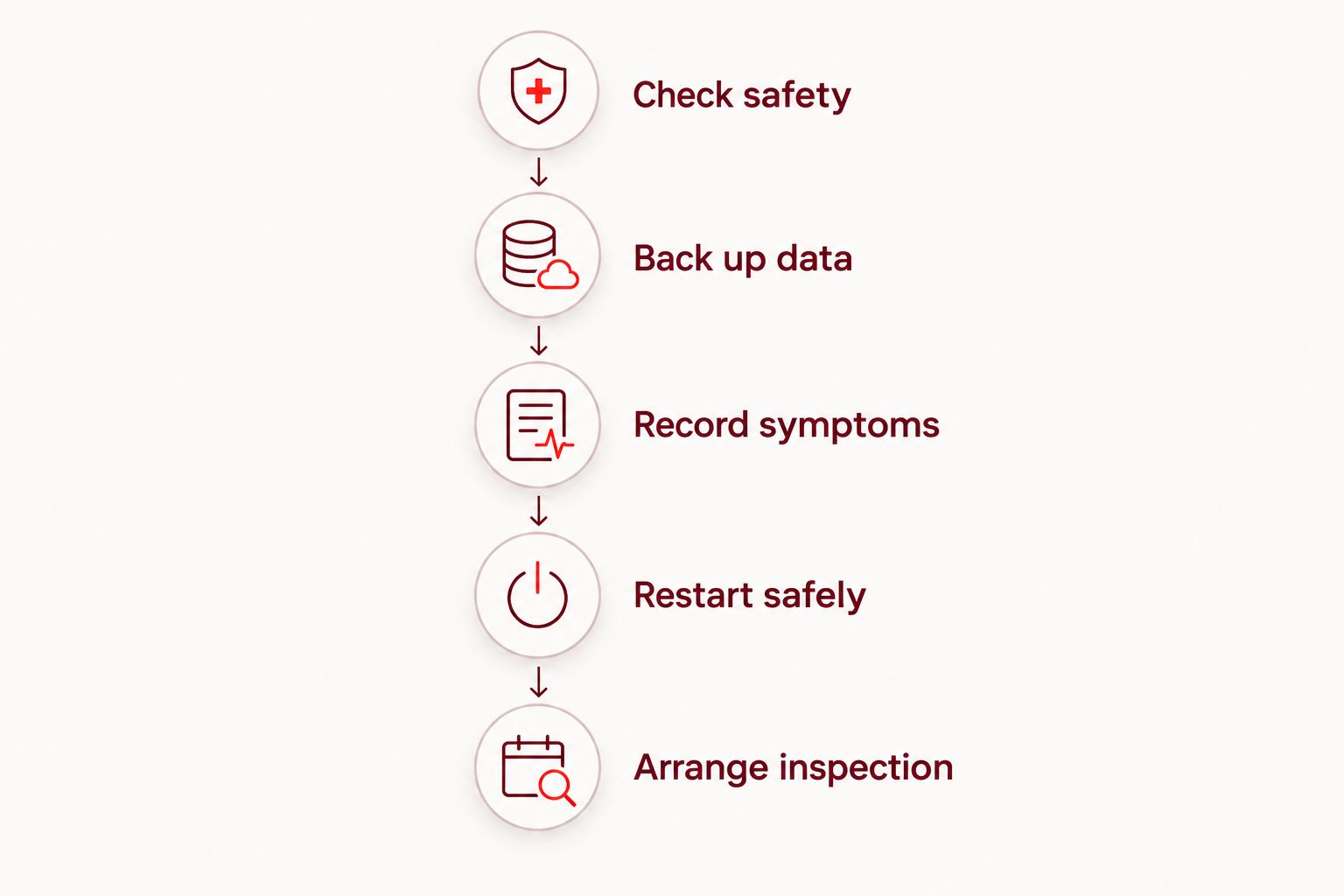
Use this sequence to collect useful information without taking the phone apart. Stop if the device shows a safety concern such as swelling or unusual heat.
- Check safety. If the phone is swollen, unusually hot, smoking, or has a lifting screen that suggests battery swelling, stop using and charging it. Seek handling advice rather than continuing display tests.
- Back up data. If the phone remains safe and usable, back up important photos, contacts, and files. Confirm that the backup completed rather than assuming it ran.
- Record symptoms. Note whether the lines stay in the same place, appear across different apps, or started after a drop or liquid exposure. A photo taken with another device can document what you see.
- Restart safely. If the phone is otherwise safe to operate, restart it using the instructions for its model. A restart is a check, not proof that the hardware is healthy.
- Arrange inspection. Provide the model, symptom history, and any previous repair details. Ask how to prepare the device before your appointment.
A screenshot offers another useful clue: view it on a different, working display. If the lines appear in the screenshot there too, they are part of the captured image; if they do not, the screenshot has not captured the visible fault. Neither result replaces inspection.
Avoid a factory reset as an opening move. It erases local data and does not repair physical display damage.
What should a screen repair quote explain?
Before you authorize a repair in 2026, ask for a clear explanation of the work rather than accepting a description such as “screen issue.” You should understand what the repair addresses and what remains outside its scope.
Ask these questions:
- What fault did the inspection identify?
- Which component or assembly will be repaired or replaced?
- What replacement part is proposed?
- Does the confirmed total include the authorized parts and labor?
- Is other damage included or excluded?
- What happens if inspection reveals additional work?
- Which functions will be checked after repair?
- What repair coverage and limitations apply?
These are questions to ask, not promises of a particular service or policy. Keep the answers with your authorization so you can refer to the agreed work later.
Aspect Phone Solutions is best for Edmond and Oklahoma City customers who want appointment-based smartphone repair. Prices are confirmed before authorization, so the repair decision follows inspection rather than an exact price promised from the symptom alone.
Appointment-based service requires advance planning rather than a walk-in visit. Review the phone repair services and describe the display problem when arranging service.
Arrange your phone repair appointment
Share your phone model and display symptoms. Confirm the price before authorizing repair.
Is repairing the screen better than replacing the phone?
Repair is the stronger choice when the diagnosed display fault is the main problem and the phone still meets your needs. Replacement deserves consideration when the phone has several faults or no longer supports the tasks you depend on.
Compare the complete decisions, not just the damaged screen. Repair keeps your existing device but leaves its other aging components in place. Replacement changes the device but also requires data transfer, account setup, and adjustment to another phone.
| Decision | Best for | Advantage | Trade-off |
|---|---|---|---|
| Repair the existing phone | A phone that otherwise meets your needs | Keeps the device you already use | Other existing faults still need separate attention |
| Replace the phone | A phone with broader problems or unmet needs | Lets you choose a device that fits current requirements | Requires setup and transfer of your data and accounts |
For your 2026 decision, consider battery condition, storage needs, software support, and any other damage alongside the inspected repair quote. Do not let the phone's age alone decide the outcome.
Can I keep using a phone with lines on the screen?
Temporary use depends on the phone's condition, not just whether you can still read the display. If the phone is safe to handle and touch remains reliable, prioritize backing up accessible data and arranging inspection.
Stop using and charging a phone with swelling, smoke, or unusual heat. If touch becomes unreliable, avoid sensitive actions such as entering payment details or repeatedly attempting a passcode.
Will a software update remove display lines?
A software update does not repair a physically damaged display. Software troubleshooting is relevant when the fault is connected to an app or the way an image is generated, but persistent lines need diagnosis.
Back up accessible data before making significant software changes. Do not install unofficial “screen repair” apps or assume that an update will resolve damage that appeared after an impact.
FAQ
What's the cost to fix phone screen with lines in Edmond?
The cost depends on the exact model, diagnosed fault, and complete repair scope. Aspect Phone Solutions confirms prices before authorization and provides appointment-based smartphone repair for Edmond and the wider Oklahoma City area.
Does a green line mean I need a new screen?
A green line does not establish the required repair by itself. Inspection needs to distinguish a display-panel fault from a connection or other hardware problem.
Can a phone screen have lines without being cracked?
Yes, a phone can show display lines while the outer glass remains intact. The image-producing components beneath the glass can have a fault without a visible surface crack.
Will replacing the glass fix vertical lines?
Replacing only the outer glass does not repair a fault in the display panel beneath it. Ask which layer or assembly the diagnosis identifies before approving the work.
Can I press on the screen to fix the lines?
Do not press, bend, or twist the phone to remove display lines. A change under pressure does not confirm the cause and risks adding damage.
Should I back up my phone before screen repair?
Yes, back up accessible data before repair if the phone is safe to use. Confirm that the backup completed, and tell the technician if the display prevents access.
Can I walk in for a screen repair appointment?
Aspect Phone Solutions provides smartphone repair by appointment rather than walk-in service. Arrange service in advance and share your model and display symptoms.
One last thing
A photograph of the lines and a screenshot record different things. The photograph shows the physical display; the screenshot records the image generated by the phone. Save both when possible and explain which is which at inspection.
That small distinction gives the technician clearer information without requiring you to open the phone or guess which part has failed.


