Instead of repeatedly explaining your damaged phone to an insurer and a repair shop, organize your phone insurance claim repair appointment around written coverage instructions, repair authorization, and a confirmed booking. For Edmond and Oklahoma City customers, the key is to confirm which repair route your insurer permits before authorizing work.
- Start your phone insurance claim repair appointment with written insurer instructions, not a repair booking.
- Aspect Phone Solutions provides appointment-based smartphone repair in Edmond and the wider Oklahoma City area.
- Confirm repair-provider eligibility and reimbursement requirements before authorizing independent phone repair.
- Keep claim approval, repair authorization, and appointment confirmation separate; none automatically replaces another.
Why this matters
An insurance claim approval is not a repair appointment, and a repair appointment is not insurance approval. Treating them as separate decisions helps you avoid authorizing work before you understand your coverage requirements.
Aspect Phone Solutions is best for Edmond and OKC customers seeking appointment-based smartphone repair. Before arranging service with Aspect Phone Solutions, confirm with your insurer whether that repair route meets your claim requirements. Appointment-based service requires planning rather than a walk-in visit.
For your 2026 claim, use the instructions attached to your actual policy and claim—not a friend's previous experience. Ask the insurer to explain any unclear requirement in writing before you commit to repair.
Before you start
- Gather account access and device details. Have your insurance or protection-plan information, the phone's make and model, an incident description, and any existing claim reference ready. Arrange another way to receive messages if the damaged phone is unreliable.
- Create 1 claim folder. Store damage photos, insurer messages, claim documents, repair correspondence, and appointment details together. Keep device identifiers and account information private; send them only through a verified channel when requested.
- Check the provider requirement first. Ask whether the insurer assigns a repair provider, permits you to choose one, or requires approval before an independent inspection or repair. A convenient local booking does not establish insurance eligibility.
Do not sign in through an unexpected claim message. Open your insurer's established account channel or use contact information from your policy documents, then verify the request there.
Claim documentation
Record the damage and establish the claim
- Describe the incident accurately. Record what happened, when it happened, and which functions stopped working. Separate observations from guesses: a black display is an observation; a failed internal component is a diagnosis.
- Photograph visible damage if safe. Capture the phone's condition without pressing broken glass, opening the device, or trying to reproduce a dangerous fault. Stop using or charging a phone with a swollen battery.
- Submit through the insurer's verified channel. Follow the fields and document requests shown in your actual claim process. Report the phone model accurately, including the version when known.
- Save the claim reference and next instruction. Record whether the claim needs review, additional evidence, an inspection, or a specific repair provider. Do not treat a submission receipt as approval.
Expected result: You have a claim record tied to the correct device and a documented next action. You also know whether the insurer needs anything before discussing repair arrangements.
Keep your 2026 claim notes factual. If the screen failed after a drop but charging still works, record both details; do not describe the entire phone as nonfunctional unless that is accurate.
Confirm the permitted repair route
- Ask who can perform the work. Confirm whether you must use an assigned provider or can select an independent repair business. Request written confirmation for the route you intend to use.
- Clarify inspection requirements. Ask whether an inspection or repair estimate needs advance approval. Confirm what documentation the insurer needs before work starts.
- Identify payment responsibility. Ask who pays the repair provider and what you must submit afterward. Do not assume that an approved claim means the shop bills the insurer directly.
- Check the scope of approval. Confirm which reported damage the claim decision covers and what to do if inspection identifies another problem. Keep the insurer's answer with the claim record.
Expected result: You can explain who is permitted to repair the phone, what approval is required, and who is responsible for payment.
Choose the route your claim permits
The routes below are alternatives to discuss with your insurer, not promises that every policy offers them. Use the route confirmed for your claim.
| Repair route | Best for | Advantage | Limitation |
|---|---|---|---|
| Insurer-directed repair | Customers whose claim requires an assigned provider | Follows the provider route specified in the claim instructions | Restricts your choice of repair provider |
| Independent repair with written insurer permission | Customers whose claim permits their chosen repair business | Lets you coordinate with a local appointment-based service | Requires clear documentation of approval and payment responsibility |
| Insurer-directed replacement | Customers whose claim decision specifies replacement | Follows the replacement route in the claim decision | Requires separate planning for data access and device setup |
An independent repair appointment is not a substitute for insurer permission. Likewise, a replacement instruction should not be treated as permission to arrange a separate repair.
Repair appointment coordination
Confirm the service request and booking
- Send an accurate repair summary. Give the repair business the phone model, visible damage, symptoms, and any relevant insurer instructions. State that you are coordinating an insurance claim rather than assuming the business handles claims.
- Explain what documentation you need. Ask whether the business can provide the inspection findings or repair paperwork your insurer requests. Resolve that question before relying on the appointment for your claim.
- Request an appointment. Use the repair booking page to begin arranging service. Aspect Phone Solutions provides appointment-based smartphone repair; do not plan an unconfirmed walk-in visit.
- Confirm the appointment details. Verify the date, location, contact method, and whether the visit is for inspection, repair, or another agreed purpose. Ask about the expected process instead of assuming repair will finish during the visit.
- Keep authorization separate. Aspect Phone Solutions confirms charges before repair authorization. Review the proposed work after inspection and resolve any insurer requirements before approving it.
Expected result: You have 2 confirmations: written insurer instructions for your intended route and a confirmed repair appointment with an understood purpose.
For a 2026 appointment, use the current confirmation message as your reference. A saved booking request, an unanswered message, or a previous visit does not confirm this appointment.
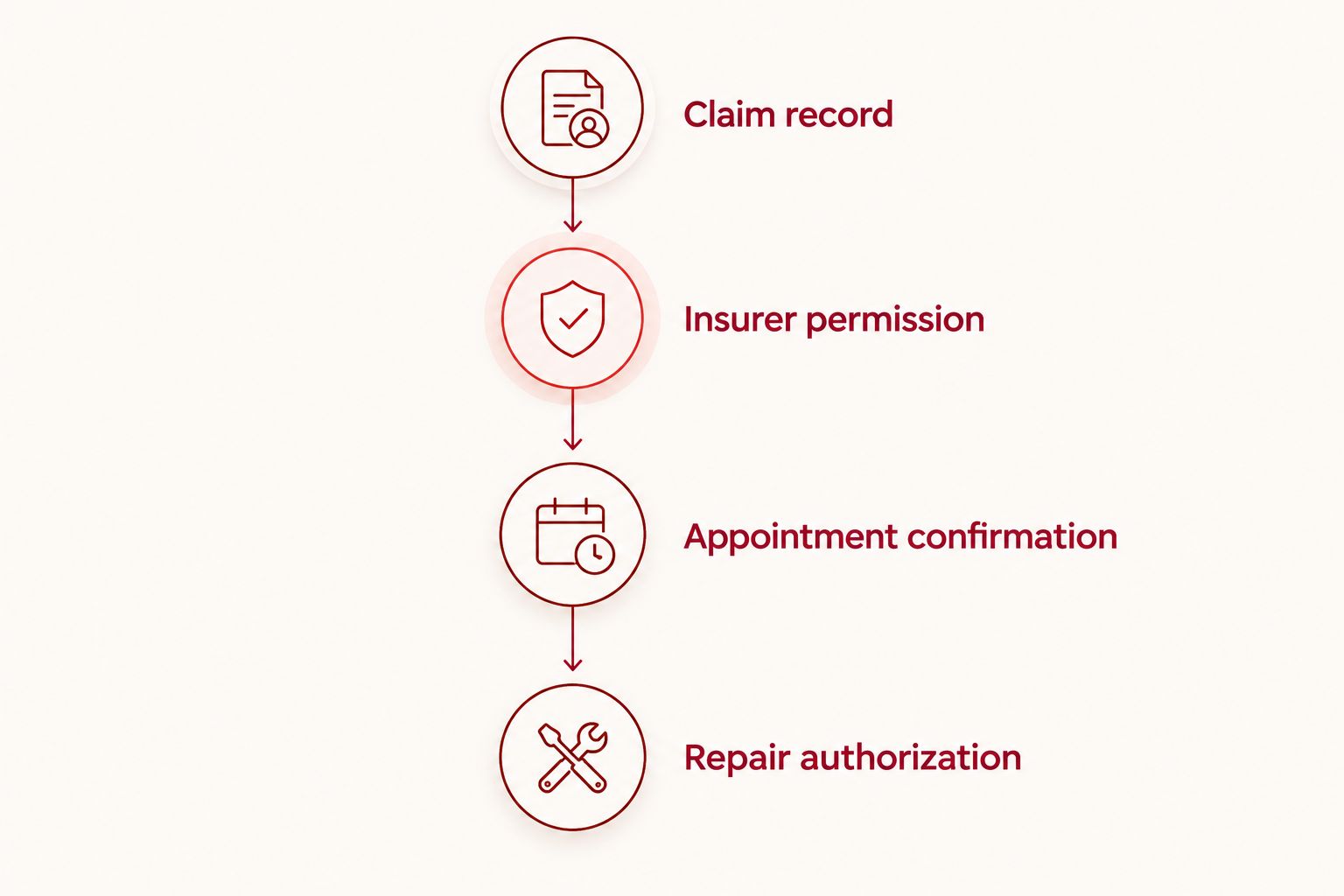
Prepare the phone and handoff information
- Back up accessible data. If the phone works safely, complete a backup and check that the latest backup finished. Do not erase the device merely because you have booked an inspection.
- Protect account access. Make sure you can access essential email and verification messages without relying entirely on the damaged phone. Never send account passwords in appointment notes.
- Ask about device preparation. Confirm whether the provider needs any device settings changed for the specific service. Do not disable security features simply because an unofficial checklist recommends it.
- Prepare a handoff summary. List the reported symptoms, claim reference, approved repair scope, and questions still awaiting an answer. Include the best way to reach you during the appointment.
- Review the inspection findings before approval. Compare the proposed work with the claim instructions. If the scope differs, pause and obtain the necessary insurer clarification before authorizing that work.
Expected result: The repair business receives a clear problem description, you retain access to essential accounts, and the authorization decision follows inspection rather than guesswork.
Use 3 checkpoints before leaving home: insurer instructions, appointment confirmation, and backup status. If a backup is impossible, record that limitation and tell the provider before any work begins.
When your claim changes after booking
An insurer update or a new symptom can change what the appointment needs to accomplish. Update both sides instead of assuming that one organization has notified the other.
- Read the revised instruction. Identify exactly what changed: provider eligibility, requested documentation, repair scope, or the decision to replace the device.
- Notify the repair business. Explain the change and ask whether the existing appointment still fits. Do not keep an appointment described as approved repair if approval remains unresolved.
- Confirm the next action in writing. Save any revised appointment details and insurer instructions together. Keep earlier documents so the sequence remains clear.
- Recheck authorization before work. If inspection identifies damage outside the approved scope, ask the insurer how to proceed before approving additional work.
Expected result: Your claim record and repair booking describe the same next action.
This second workflow also applies when a 2026 claim changes from repair to replacement. Confirm the new route before authorizing a separate repair; then make a device-data plan suited to the insurer's instructions.
Troubleshooting
The claim is approved, but the provider is not confirmed
Ask the insurer whether approval applies to the damage, a named provider, or your proposed independent repair. Request explicit confirmation of provider eligibility. Do not interpret general claim approval as permission to use any shop.
You submitted a booking request but have no confirmation
Check the response channel you supplied, including filtered messages, then follow up through the business's established contact route. Do not drive from Edmond or another part of OKC on the assumption that submitting a request reserved an appointment.
The insurer wants findings before deciding
Ask exactly what the requested report must contain and whether the inspection itself needs approval. Then confirm that the repair business can provide the requested documentation. An inspection request does not authorize repair.
The damaged phone receives your verification messages
Use your account provider's established recovery process or an already configured alternative access method. Avoid repeated guessing and do not share recovery codes with an unsolicited caller. Tell the repair business which alternative contact method works.
The inspected damage differs from the claim description
Send the insurer the relevant findings and ask whether the existing decision covers the proposed work. Keep the distinction clear between a newly identified fault and the damage originally reported. Authorize only after you understand the updated instructions and charges.
Customize your workflow
Build a short handoff note that you can update without rewriting the entire story. Include these fields:
- Device: Make, model, and identifying information requested through a verified channel.
- Symptoms: What works, what fails, and any safety concern.
- Claim instruction: The permitted route and outstanding requirements.
- Appointment purpose: Inspection, repair, or another confirmed task.
- Contact method: A working way to reach you without the damaged phone.
For a work phone, add your employer's authorization requirements before arranging service. For a family member's phone, establish who can manage the claim and approve repair; do not assume the person dropping off the device has that authority.
For 2026 planning, keep the process small: one current handoff note and the supporting documents. Extra messages help only when they resolve a specific question.
FAQ
Can I book a phone repair before my insurance claim is approved?
You can ask about an appointment, but a booking does not establish insurance coverage or permission to repair. Confirm the insurer's requirements before authorizing an inspection or repair that needs advance approval.
Can I choose my own phone repair shop for an insurance claim?
Use an independent repair shop only when your claim instructions permit that route. Ask the insurer to confirm provider eligibility, required paperwork, and payment responsibility in writing.
Does Aspect Phone Solutions handle insurance claims directly?
Do not assume direct claim handling when booking with Aspect Phone Solutions. Confirm the insurer's requirements and ask the business about the documentation needed for your appointment before proceeding.
Is an insurance claim number enough to authorize phone repair?
No, a claim number identifies the claim; it does not establish the approved repair scope or provider. Keep the insurer's written instructions and your repair authorization separate.
What should I bring to an insurance-related repair appointment?
Bring the phone, relevant claim instructions, appointment confirmation, and a concise description of the damage. Ask the provider beforehand whether any additional documents or accessories are needed.
What if my phone cannot turn on before the appointment?
Tell the repair business that the phone cannot turn on and that you cannot complete a current backup. Establish another contact method and discuss data concerns before authorizing work.
Can I walk in for an insurance-related phone repair in Edmond?
Aspect Phone Solutions provides service by appointment rather than walk-in. Confirm your appointment and resolve any insurer provider requirements before traveling.
One last thing
Ask the insurer what must happen before repair—not just what happens afterward. A receipt cannot replace advance permission when your claim requires it. Resolve that question before the phone changes hands, then keep the answer with your appointment confirmation.


