Yes—a phone screen with no visible cracks and no touch response can often be fixed, but the right repair depends on whether the problem is software, an accessory, or internal hardware. Intact glass does not rule out damage to the touch-sensing layer beneath it. Start with safe checks, protect your data, and get an inspection if touch remains unresponsive.
- Phone screen touch not working not cracked? Intact glass does not rule out touchscreen hardware damage.
- Try a model-specific restart and check accessories before assuming you need screen replacement.
- Stop charging a wet, swollen, or unusually hot phone; do not press a lifting screen back down.
- Aspect Phone Solutions offers appointment-based smartphone repair in Edmond and the wider Oklahoma City area.
Can a non-cracked phone screen with no touch response be fixed?
Yes, but a screen replacement is not automatically the answer. A frozen operating system, interference from an accessory, a failed screen assembly, or an internal connection problem can produce similar symptoms. The visible condition of the glass cannot distinguish between them.
For a repair decision in 2026, separate what you can safely check at home from what requires inspection. You can review local phone repair services after noting whether the phone still displays an image, rings, or responds to its physical buttons.
| Possible cause | Best for this first step | Benefit | Limitation |
|---|---|---|---|
| Temporary software freeze | Model-specific restart | Tests a temporary software problem without opening the phone | Does not repair damaged hardware |
| Protector, moisture, or accessory interference | Careful cleaning and accessory removal | Rules out external causes | Does not prove the screen is healthy |
| Failed touch-sensing hardware | Professional screen assessment | Checks whether the screen assembly is responsible | Glass appearance alone cannot confirm the fault |
| Internal connection or board fault | Internal inspection | Looks beyond the screen itself | A new screen alone does not address every internal fault |
A working picture with dead touch is useful evidence, not a diagnosis. Write down exactly what still works before trying to change settings or authorize parts.
Why this matters
A phone can look undamaged while preventing you from answering calls, accessing work accounts, or approving a backup. That makes a no-touch failure more than a cosmetic problem. Repeatedly tapping harder does not identify the cause and adds pressure to a device whose internal condition is unknown.
The useful question in 2026 is not simply whether the glass is cracked. It is whether the failure comes from something reversible outside the phone, a temporary software problem, or a component that needs repair.
Protect access to your data before attempting a reset. Restarting and factory-resetting are different actions: a restart reloads the operating system, while a factory reset erases local user data.
What should you try before arranging repair?
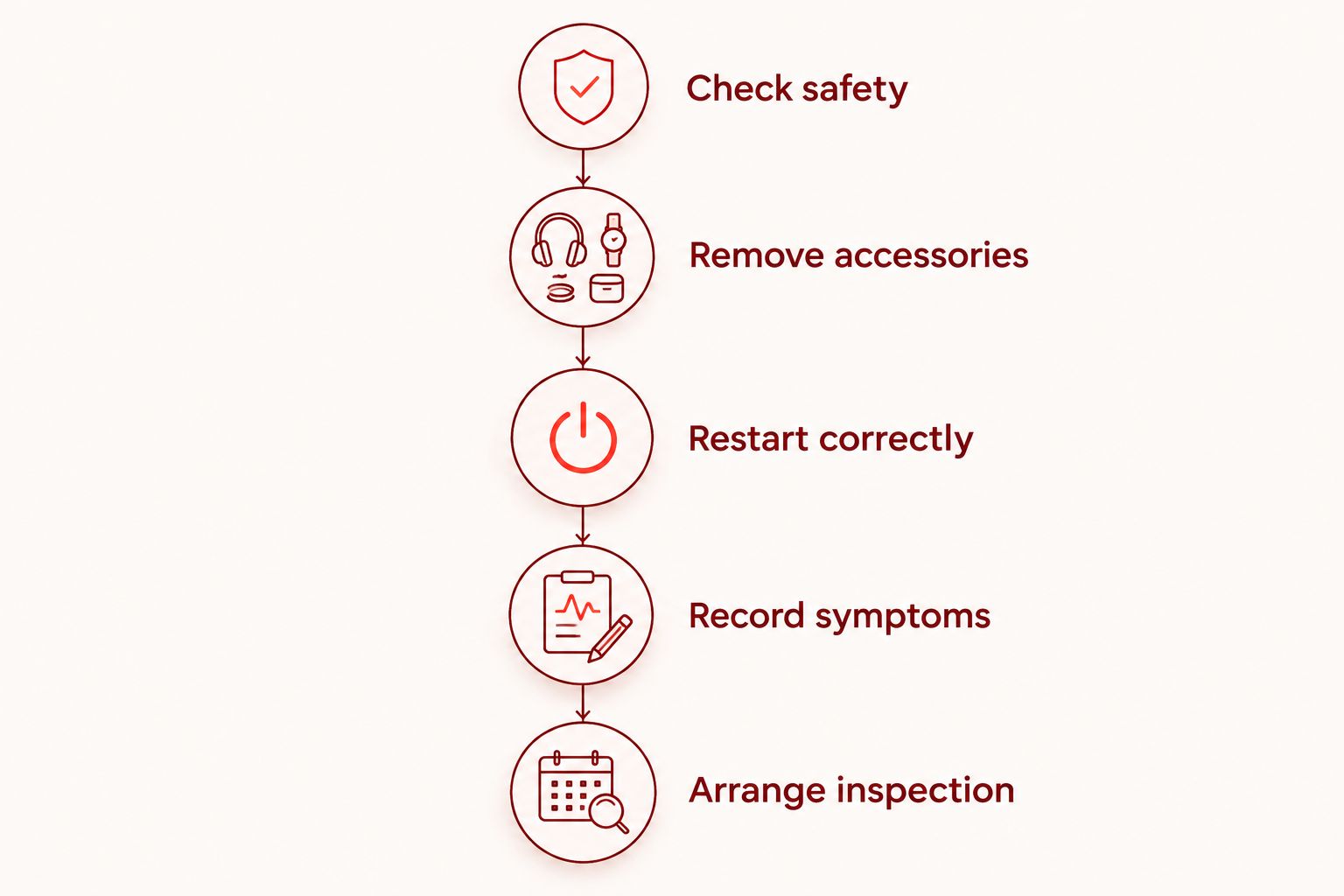
Use the following sequence only if the phone has no signs of liquid exposure, swelling, unusual heat, or physical separation. If any of those signs are present, stop ordinary troubleshooting and explain them when arranging an assessment.
1. Check safety
Look along the screen edges without pressing them. A display lifting away from the frame can indicate battery swelling or another internal problem; do not push it flat or clamp it shut.
If the phone is wet, disconnect charging accessories and do not reconnect them for testing. Avoid heat, rice, and inserting objects into openings. For a phone that is smoking or poses an immediate fire risk, move away and contact emergency services.
2. Remove accessories
With dry hands, wipe the screen gently using a clean, soft cloth. Disconnect wired accessories and test the phone away from its charger if it is safe to do so.
Remove a case that presses against the screen edges. If an ordinary removable screen protector is damaged or interfering with use, follow its removal instructions; do not peel protective layers from a foldable display unless the manufacturer explicitly permits it.
3. Restart correctly
Use the manufacturer's force-restart instructions for your exact model. Button combinations differ, and a generic instruction to hold the power button is not correct for every phone.
A force restart normally does not erase stored data, but you will generally need your passcode before biometric access works again. Make sure you know that passcode before restarting a phone you currently access through a fingerprint or face recognition.
4. Record symptoms
After restarting, check whether touch fails everywhere or only in a strip, corner, or particular app. Note whether the phone rings, vibrates, shows notifications, or responds to its physical buttons.
If touch returns, back up your data before continuing to troubleshoot. A temporary recovery is an opportunity to protect files, not proof that an intermittent fault is gone.
5. Arrange inspection
If touch remains dead across the lock screen and other screens, stop repeating the same checks. Tell the repair provider what happened before the failure and which steps changed nothing.
Do not open the phone or reseat internal connectors as a casual troubleshooting step. Opening a smartphone introduces risks to its battery, cables, and seals that are separate from the original touch problem.
Why can touch fail when the glass looks fine?
The outer glass protects the screen, but it is not the entire touchscreen system. The display produces the picture, while touch-sensing components detect input. Those functions can fail separately even when they are built into the same screen assembly.
A drop can damage internal components without leaving an obvious crack. Liquid exposure, connection faults, and software problems also belong in the assessment; none can be confirmed from the glass alone.
For a 2026 repair appointment, describe these factors rather than guessing which part needs replacing:
- Failure pattern: Total touch loss and a narrow dead strip are different observations.
- Recent impact: Report a drop or pressure event even if the phone still looks normal.
- Liquid exposure: Mention spills, rain, or condensation before anyone powers or charges the phone for testing.
- Accessory behavior: Explain whether disconnecting the charger or removing a case changed the response.
- Repair history: Report a previous screen replacement or other recent repair.
- Restart result: State whether touch returned, stayed dead, or failed again after briefly working.
These details help define the inspection. They do not establish a repair price or guarantee that a particular replacement part will solve the problem.
Does no touch response always mean screen replacement?
No touch response does not always require screen replacement. If a restart or accessory change resolves the problem, replacing hardware without further evidence is not the first move.
When the touch-sensing hardware has failed, the repair can involve replacing the screen assembly despite the absence of cracks. Whether the touch layer is serviced separately depends on the device's construction and the repair method; do not assume a glass-only repair addresses dead touch.
Ask what evidence supports the proposed repair. Also ask how the provider will handle a screen that displays normally but still fails touch testing after a replacement is connected.
Authorize the diagnosis-supported repair, not a part chosen from appearance alone. A board or connection problem requires a different decision from an isolated screen fault.
Can you back up a phone when the touchscreen does not work?
A backup is sometimes possible without working touch, but existing access permissions matter. A previously trusted computer and an already enabled cloud backup offer different routes; neither guarantees you can create a new backup while the phone is locked.
Check your cloud account from another trusted device to see which photos, contacts, and files are already present. Do not assume that seeing some recent photos means every app and file has been backed up.
Connecting a phone to a computer can require an on-screen permission or passcode. External input accessories also depend on the model, connection support, and security settings, so buying an adapter is not a guaranteed solution.
If your only copy of important data is on the phone, say so before authorizing any work. Ask whether the proposed procedure involves erasing the device, and do not approve a factory reset simply because ordinary tapping has stopped working.
Should you repair the phone or replace it?
Get the fault identified before making the repair-or-replace decision. An intact screen does not establish that the repair is minor, and dead touch does not establish that the entire phone is beyond repair.
Use your phone's actual condition in the decision. Consider its battery behavior, other damage, ongoing software support, and whether it still meets your needs apart from the touchscreen failure.
Repair preserves a familiar device when the diagnosed fault is limited and the proposed work makes sense for you. Replacement avoids investing in a phone with several unresolved problems, but it also requires planning for account access and data transfer.
For your 2026 decision, ask for the repair scope and confirmed price after inspection, before authorization. Compare that proposal with replacement only after you understand what the repair does—and does not—address.
How should you prepare for an appointment in Edmond or OKC?
Aspect Phone Solutions is best for Edmond and Oklahoma City customers seeking appointment-based smartphone repair. Service is by appointment rather than walk-in, and prices are confirmed before authorization.
When arranging an assessment, provide the phone model and describe the failure in plain language. For example, explain that the picture looks normal but no part of the screen accepts touch, or that touch works only along an edge. Do not include your passcode in an ordinary booking message.
Before your 2026 appointment, prepare the information that changes the repair decision:
- Whether the failure followed a drop, spill, update, or previous repair.
- Whether the phone still rings, vibrates, charges, or displays normally.
- Whether a restart or accessory removal changed anything.
- Whether your important files are backed up elsewhere.
- Whether recovering data matters more to you than returning the phone to daily use.
Use the booking page to arrange service rather than assuming you can walk in. Ask about the assessment process and timing without treating an appointment as a promise of a particular repair outcome.
FAQ
Can my phone's touchscreen be broken even if the glass isn't cracked?
Yes, touch-sensing hardware can fail beneath intact glass. The outside appearance does not establish whether the screen assembly, software, or another internal component is responsible.
Why does my screen show a picture but not respond to touch?
A visible picture does not prove that touch input is working because displaying an image and detecting touch are separate functions. A software freeze or hardware fault can interrupt touch while the picture remains visible.
Should I factory-reset my phone if touch stops working?
Do not make a factory reset your first troubleshooting step because it erases local user data. Start with safe external checks and the correct model-specific restart, then seek inspection if touch remains unresponsive.
Can a screen protector stop my phone from responding?
A screen protector can interfere with touch, so checking an ordinary removable protector is a reasonable external test. Do not peel protective layers from a foldable display without the manufacturer's instructions.
Will replacing the screen fix every no-touch problem?
Screen replacement does not fix every no-touch problem. It addresses a failed screen assembly, not every software issue, connection fault, or board problem.
How much will it cost to fix my uncracked touchscreen?
The repair price needs to be confirmed after the phone is inspected and the proposed work is identified. Aspect Phone Solutions confirms prices before authorization rather than treating intact glass as proof of a particular repair.
Can I bring my phone in without an appointment?
Aspect Phone Solutions provides smartphone repair by appointment rather than walk-in. Arrange service before traveling from Edmond or elsewhere in the Oklahoma City area.
One last thing
If touch returns briefly, back up first and investigate second. Opening apps to see whether the phone feels normal uses the same temporary access you need to protect your files.
Then record what restored touch and whether the failure returns. That history gives the repair assessment more useful evidence than a photograph of uncracked glass.


