
Nonprofit workers’ phone repair is the process of restoring a work-critical smartphone with the aim of keeping donor communication, volunteer coordination, and service delivery running. For Edmond and Oklahoma City staff, the repair decision should account for sensitive information, spending approval, and who handles calls while the phone is away.
- Phone repair for nonprofit workers starts with protecting work access and confirming who can authorize the repair.
- Aspect Phone Solutions fits Edmond and OKC workers seeking appointment-based smartphone repair with pricing confirmed before authorization.
- Back up permitted information, arrange call coverage, and confirm the repair scope before handing over your phone.
- Choose repair or replacement based on the inspected fault, work requirements, and the organization’s approval process.
Why phone repair matters for nonprofit workers
A damaged personal phone is inconvenient. A damaged phone used for nonprofit work also creates decisions about client confidentiality, shared accounts, reimbursement, and responsibility for missed messages. Your first task is to separate the hardware problem from the work that must continue.
For your 2026 repair plan, identify which activities actually depend on the device. A cracked screen that still responds presents a different scheduling problem from a phone that cannot receive calls or verification codes. Describe the failed task rather than guessing which component needs replacing.
Protect work continuity before choosing a repair appointment. If your organization uses a shared inbox or an approved alternate contact, arrange coverage before handing over the phone. Do not forward confidential messages to a personal account just to keep them accessible.
If backup preparation is your main concern, the iCloud backup to phone drop-off workflow provides a separate guide to that part of the process. Follow your organization’s rules before copying work information anywhere.
How to arrange phone repair without disrupting your work
Identify the work functions you need to restore
Start with a written symptom list. Record whether the screen displays an image, touch responds, charging works, and callers can hear you. Include when the fault happens: during calls, after charging, or only when using a particular application.
Check simple settings yourself when the phone is safe to use. Confirm that silent mode, call volume, or an accidentally connected headset is not causing the apparent fault. These checks describe the problem; they do not replace an inspection or prove that a component has failed.
For a practical starting point, list 3 work functions you cannot lose, such as calls, calendar access, and sign-in verification. This is a planning exercise, not a technical test. It gives your supervisor a clear reason for the repair and helps you decide what needs temporary coverage.
Do not keep testing a phone with a swollen battery, unusual heat, or visible battery damage. Stop using and charging it, and seek safe handling instructions.
- Write down the phone model from settings or purchase records.
- Describe what fails without naming an unconfirmed cause.
- Note drops, liquid exposure, and earlier repairs.
- Separate essential work functions from minor annoyances.
- Flag swelling, heat, or damaged glass before arranging transport.
Protect work information and account access
Use the backup tools already permitted by your organization before considering another service. Check that the backup completed; turning on a setting is not the same as confirming that your information was copied. Open an approved backup destination and check representative files when possible.
A backup also does not guarantee continued access to work accounts. If your phone receives sign-in prompts or contains an authentication app, ask your administrator how you will sign in while it is being repaired. Use the organization’s approved recovery method rather than improvising a shared password.
For your 2026 handoff, distinguish personal photos from donor records, beneficiary messages, and internal documents. Do not create a new personal cloud copy of restricted information simply because the phone needs repair. If the screen prevents backup, tell the repair provider before authorizing work and explain that preserving information matters.
Keep account passwords private. Ask what device access is needed for testing and involve your administrator when the phone is managed by your employer.
- Confirm the latest permitted backup completed successfully.
- Check access to work email from an approved alternate device.
- Arrange an approved alternative for sign-in verification.
- Ask your administrator about restrictions on employer-owned phones.
- Explain any data-preservation requirement before authorizing work.
Confirm ownership and repair authorization
Check your organization’s equipment and reimbursement rules first. A phone used for work is not necessarily an employer-owned phone, and permission to use it does not establish permission to spend organizational funds on it. Resolve that distinction before arranging the repair.
Choose 1 named approver for the repair decision. Give that person the symptoms, the work functions affected, and the proposed next step. If you pay personally and request reimbursement later, confirm the documentation required before you commit.
Aspect Phone Solutions is best for Edmond and OKC nonprofit workers seeking appointment-based phone repair with pricing confirmed before authorization. That arrangement suits customers who need a defined approval point. The limitation is equally clear: service is by appointment, not walk-in, and the phone needs inspection before an exact repair price is stated.
Use the booking page to arrange the appointment rather than assuming you can arrive between visits or meetings. Explain who must approve the proposed work.
- Establish whether the device is personally or organizationally owned.
- Name the person authorized to approve the repair.
- Confirm what information reimbursement requires.
- Ask for the proposed scope after inspection.
- Authorize only the work you understand and approve.
Arrange coverage around the appointment
Build a temporary coverage plan yourself before booking around a busy day. Identify the calls, messages, and appointments that need attention while the phone is away. Use existing approved channels rather than introducing another messaging app that colleagues or clients must learn.
Write down 2 alternate contacts: someone who can handle work communication and someone the repair provider can reach about authorization. They can be the same person if appropriate, but the responsibilities should be explicit. An email address is useful only if you can access it without the damaged phone.
An appointment is not a promised completion time. Ask when the phone will be assessed, how updates will reach you, and whether the proposed work can fit your schedule. For 2026 outreach days or fundraising events, plan around the confirmed information rather than an assumed pickup time.
Aspect Phone Solutions provides appointment-based smartphone repair; confirm the arrangements for your particular device before changing your work calendar.
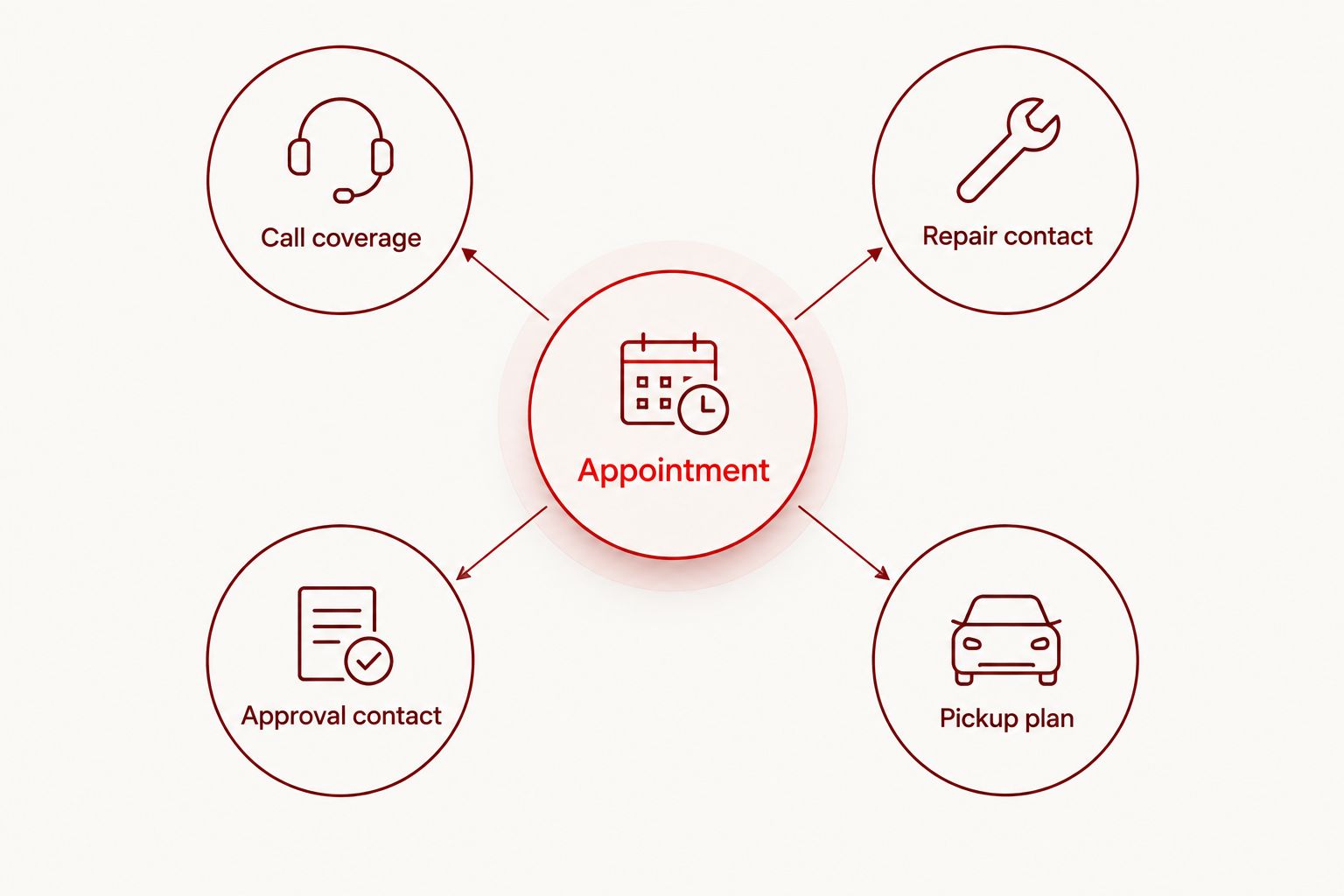
- Call coverage: assign responsibility for urgent work messages.
- Repair contact: provide an accessible alternate contact method.
- Approval contact: identify who can authorize the proposed work.
- Pickup plan: arrange collection around the confirmed update.
Compare the inspected repair with the alternatives
Start your comparison with the phone you already own. Write down what works, what does not, and which work requirements the device must meet. A repair decision should address the inspected fault, not simply the most noticeable damage.
Ask what the proposed repair is intended to restore and what remains outside its scope. Replacing damaged glass, for example, does not establish that an unrelated charging complaint has been addressed. If several symptoms exist, make sure the decision covers each one rather than treating them as a single confirmed fault.
Then compare repairing the current phone, using an approved spare, and replacing the device. An existing spare can maintain communication during assessment, but it still needs approved account access. Replacement involves setup and information transfer; repair does not automatically eliminate those concerns either.
For a 2026 decision, compare the complete work outcome, not just the damaged part. Keep authorization separate from the initial appointment, and ask for clarification if the proposed scope changes after inspection.
- Ask which reported symptoms the repair addresses.
- Identify unresolved faults or testing limitations.
- Check whether an approved spare meets essential work needs.
- Include account setup and information transfer in the decision.
- Reconfirm authorization if the proposed scope changes.
Test the phone before returning it to work
Start with the functions you can check yourself at handoff. Make a call, listen to the other person, and confirm they can hear you. Check touch response and the repaired function without opening confidential work records in front of anyone unnecessarily.
Then test the tasks from your original work-function list. A phone can make ordinary calls while still needing work-account setup or an authentication check. Complete those checks through your organization’s approved process, particularly if an administrator manages the device.
Ask the provider to explain anything that remains unresolved. Do not treat a successful screen test as confirmation that every unrelated feature has been inspected. Keep the repair documentation with the organization’s equipment or reimbursement records, according to its rules.
Finally, end the temporary coverage arrangement deliberately. Tell the colleague handling your messages that you have resumed responsibility, and check for anything that arrived while the phone was away.
- Test the repaired function and your originally reported symptoms.
- Confirm microphone, speaker, and touch response where relevant.
- Restore approved work-account access.
- Save repair documentation in the correct place.
- Close the temporary call and message coverage arrangement.
Compare your phone repair options
Choose an option based on the inspected problem and your organization’s requirements. The table separates repair decisions from temporary workarounds: a spare keeps work moving, but does not fix the damaged phone.
| Option | Best for | Main advantage | Key limitation |
|---|---|---|---|
| Aspect Phone Solutions appointment-based phone repair | Edmond and OKC staff who want inspection before repair authorization | Pricing is confirmed before authorization | Requires an appointment rather than a walk-in visit |
| Manufacturer or authorized service route | Workers whose organization requires that route | Matches an organization’s specified service process | You must check the particular provider’s terms and scheduling |
| Approved organizational spare | Staff who need another device during assessment | Separates immediate communication needs from the repair decision | Requires suitable account access and does not repair the original phone |
| Replacement device | Organizations that decide the current phone no longer meets work requirements | Provides an alternative to repairing the existing device | Requires approval, setup, and information transfer |
A temporary spare and a repair are complementary options, not competing solutions. You can use approved backup equipment while the damaged phone is assessed. Do not assume a repair provider supplies a loaner; arrange any spare through your organization unless told otherwise.
Common mistakes nonprofit workers make
Treating work use as spending authorization
Using your personal phone for volunteer coordination does not establish a reimbursement agreement. Confirm who owns the repair decision before authorizing work, and keep the proposed scope separate from permission to attend an appointment.
Copying sensitive records into a personal account
A rushed backup can create a separate information-handling problem. Use approved storage and ask your administrator what to do when the damaged phone prevents normal backup. Repair preparation is not a reason to bypass access rules.
Booking between commitments without arranging coverage
A calendar opening does not guarantee that assessment, authorization, repair, and collection will fit inside it. For your 2026 schedule, confirm the appointment arrangements and assign urgent communication to someone else rather than relying on an assumed return time.
Describing a diagnosis instead of a symptom
Saying that a phone “needs a new charging port” can hide useful information about intermittent charging or a damaged cable. Report exactly what happens and let inspection establish the repair scope. Mention related symptoms even if they seem minor.
Approving work without checking the remaining limitations
Restoring one function does not mean every fault has been resolved. Ask what the proposed work covers, what remains uncertain, and what you should test afterward. Keep those answers with the approval record so the organization understands the decision.
FAQ
What’s the best first step for phone repair for nonprofit workers?
Identify the work functions affected, then confirm who can authorize the repair. Protect permitted backups and arrange access to urgent communication before handing over the phone.
Can I walk into Aspect Phone Solutions for a repair?
Aspect Phone Solutions provides service by appointment rather than walk-in. Arrange an appointment and confirm the handoff details before traveling from Edmond or elsewhere in the Oklahoma City area.
Can I get an exact repair price before my phone is inspected?
An exact repair price requires inspection of the phone. The proposed repair and pricing should be clear before you authorize the work.
Should I repair my work phone or replace it?
Choose after comparing the inspected fault with the phone’s remaining work requirements. Include organizational approval, account setup, information transfer, and unresolved problems in the decision.
What should I do if my work phone receives all my sign-in codes?
Arrange an approved alternate sign-in method before the repair handoff. Ask your administrator how to maintain access without sharing passwords or bypassing organizational security rules.
Can I back up donor or client information to my personal cloud account?
Only use a personal cloud account if your organization explicitly permits that use for the information involved. Otherwise, use approved storage or ask your administrator for a repair-preparation method.
What should I check when I collect my repaired phone?
Test the repaired function and the symptoms you originally reported. Then confirm approved work-account access, retain the repair documentation, and tell your temporary contact that you are handling messages again.
One last thing
Your most useful repair note is a plain-language record of the failed task. “Callers cannot hear me during ordinary calls” gives the provider a symptom to investigate and gives you something concrete to test afterward. “Phone broken” does neither.
Before your 2026 appointment, write that note somewhere you can access without the damaged phone. Add the approver’s contact details and your essential work functions. A repair plan stored only on an unusable device is not a usable handoff plan.


