A phone repair shop can help with some access problems, but it cannot automatically remove a carrier restriction, recover a forgotten passcode, or remove an account ownership lock. The right solution depends on what is locked: repairing a broken screen can restore access when you know the passcode, while carrier approval or account recovery requires a different process.
- Can a phone repair shop unlock a phone? Sometimes; carrier locks, forgotten passcodes, and broken screens need different solutions.
- A carrier unlock does not remove your screen passcode or an account ownership lock.
- Resetting a phone erases local data and does not necessarily remove its account ownership requirements.
- Aspect Phone Solutions offers appointment-based phone repair in Edmond and OKC; confirm whether your specific problem fits before scheduling.
Can a phone repair shop unlock a phone?
Yes, when the problem falls within the shop's services and the phone's security requirements allow it. However, repairing access is not the same as defeating security. A technician can repair damaged hardware without having the authority or credentials needed to remove a carrier or account restriction.
For your 2026 repair decision, identify the exact message on the phone before choosing a service. Use this comparison to separate the common problems customers describe as a locked phone.
| Problem | Best for getting help | What that route addresses | Main limitation |
|---|---|---|---|
| Carrier restriction | The carrier that locked the phone | Eligibility to use another carrier | Does not remove a screen passcode |
| Forgotten screen passcode | The manufacturer's official recovery instructions | Resetting access through the supported process | Usually requires erasing the device |
| Apple Activation Lock | The linked account owner or Apple's official support process | Account ownership verification | A hardware repair does not remove it |
| Android account verification after reset | The previously linked Google account and official recovery | Verification required during setup | Resetting again does not establish ownership |
| Broken screen preventing passcode entry | A phone repair technician | Restoring the display or touch input | You still need the correct passcode |
If the display is damaged, read how long a phone screen repair takes before arranging a visit. Describe both the damage and the lock message so the appointment addresses the actual problem.
Why this matters
Choosing the wrong service can leave you with the same restriction after the repair. A working screen does not make a carrier approve another network, and a factory reset does not prove that you own the account linked to the device.
Your photos and messages also change the decision. If keeping local data matters, say so before authorizing any reset or software work. Restoring a usable phone and preserving its existing data are separate goals.
For customers in Edmond and Oklahoma City, the practical first move is a clear description—not a trip across town. Write down the message, identify your phone model, and explain whether you know the passcode.
Carrier lock: start with the original carrier
A carrier lock restricts which mobile networks a phone can use. It does not control whether you can open your photos, read messages already on the device, or enter your screen passcode.
The carrier that applied the restriction sets the eligibility requirements. Those requirements depend on its policy and the device's status, so follow the carrier's current instructions rather than treating a repair shop's estimate as approval.
What to check before requesting a carrier unlock
- Identify the carrier that originally locked the phone, not just the network you want to join.
- Check the carrier's official eligibility requirements for your device.
- Gather the account and ownership information the carrier requests.
- Confirm compatibility with the intended network separately from lock status.
A repair shop can explain the distinction or help you locate the relevant device information if that service is offered. It cannot make an ineligible phone eligible simply by replacing a component.
Best for switching networks: start with the original carrier. The benefit is a direct answer from the organization controlling the restriction; the limitation is that carrier approval does not guarantee compatibility with every network.
Forgotten passcode: protect your data before a reset
A forgotten screen passcode is different from a carrier lock. On modern smartphones, the passcode helps protect access to encrypted data, so a technician should not promise access to your existing files merely because you can prove ownership.
The manufacturer's supported recovery process commonly involves erasing the phone and setting it up again. A backup can restore information it contains, but it cannot restore files that were never backed up.
Before following recovery instructions in 2026, check the manufacturer's current guidance for your exact model and software. Do not assume an old video applies to the phone in your hand.
What to establish before authorizing a reset
Confirm whether you know the Apple Account or Google account credentials associated with the phone. Check whether your photos, contacts, and other important information exist in a cloud account or another device you can already access.
Then ask what the proposed procedure changes. Is the technician repairing hardware, reinstalling software, or erasing the phone? Those actions have different consequences, and permission for one should not be treated as permission for all.
Best for a forgotten passcode: use the manufacturer's supported recovery process. Its advantage is a documented route back to a usable device; its drawback is the potential loss of information stored only on the phone.
Account ownership locks: recover the account first
Apple Activation Lock and Android's account verification after a reset serve an ownership-protection purpose. They are not ordinary broken-screen symptoms, and replacing the display does not supply the missing account credentials.
For an iPhone, follow Apple's official Activation Lock guidance. Depending on the circumstances, the linked account owner must remove the device from the account, or you must use Apple's documented support process with the required evidence.
For an Android phone requesting a previously synced Google account, use the account recovery process associated with that account. Additional manufacturer or workplace management restrictions can require help from the organization that controls them.
If you bought the phone used
Contact the seller before authorizing unrelated repair work. Ask the seller to complete the legitimate account-removal process without sharing passwords with you.
A receipt from a private sale is not itself an account credential. Do not assume that paying for a reset, replacing the screen, or changing the SIM card will resolve the ownership check.
Best for an account-locked used phone: resolve ownership with the seller or account provider first. This addresses the actual barrier, but depends on successful verification rather than a physical repair.
Broken screen: repair can restore access without changing the lock
A phone can appear inaccessible because its display is black, its touch input fails, or damage prevents accurate passcode entry. If you know the correct passcode, repairing that hardware can let you enter it normally again.
The distinction matters: the technician is restoring your ability to use the phone's existing security, not removing that security. Screen replacement also does not resolve a separate carrier restriction or missing account password.
Tell the shop whether the phone still rings, vibrates, or displays notifications. Report any liquid exposure and whether the damage occurred before the access problem. These observations help describe the fault without pretending to diagnose it remotely.
Avoid repeated passcode attempts on a damaged touchscreen. Incorrect input can trigger security delays, and devices configured to erase after repeated failed attempts present an additional data risk.
Best for a known passcode and failed touch input: investigate the hardware fault first. The benefit is addressing the physical obstacle; the limitation is that repairing hardware cannot recover a passcode you have forgotten.
Why the right solution varies
The correct route depends on these practical factors, not on a blanket promise to remove every lock:
- Lock type: Carrier restrictions, screen passcodes, and ownership checks require different permissions and processes.
- Account access: Knowing the linked account credentials changes which official recovery steps you can complete.
- Hardware condition: A failed display or touch panel can prevent entry even when your credentials are correct.
- Backup status: A usable backup changes the consequences of an erase-and-restore process.
- Ownership history: A used, inherited, or employer-managed phone can require action from another authorized person.
- Device model: Recovery instructions and settings differ between manufacturers and software versions.
Treat a 2026 service estimate as a proposal for a named task. Ask what outcome it covers and what remains your responsibility, such as entering credentials or obtaining carrier approval.
What should you do before booking an appointment?
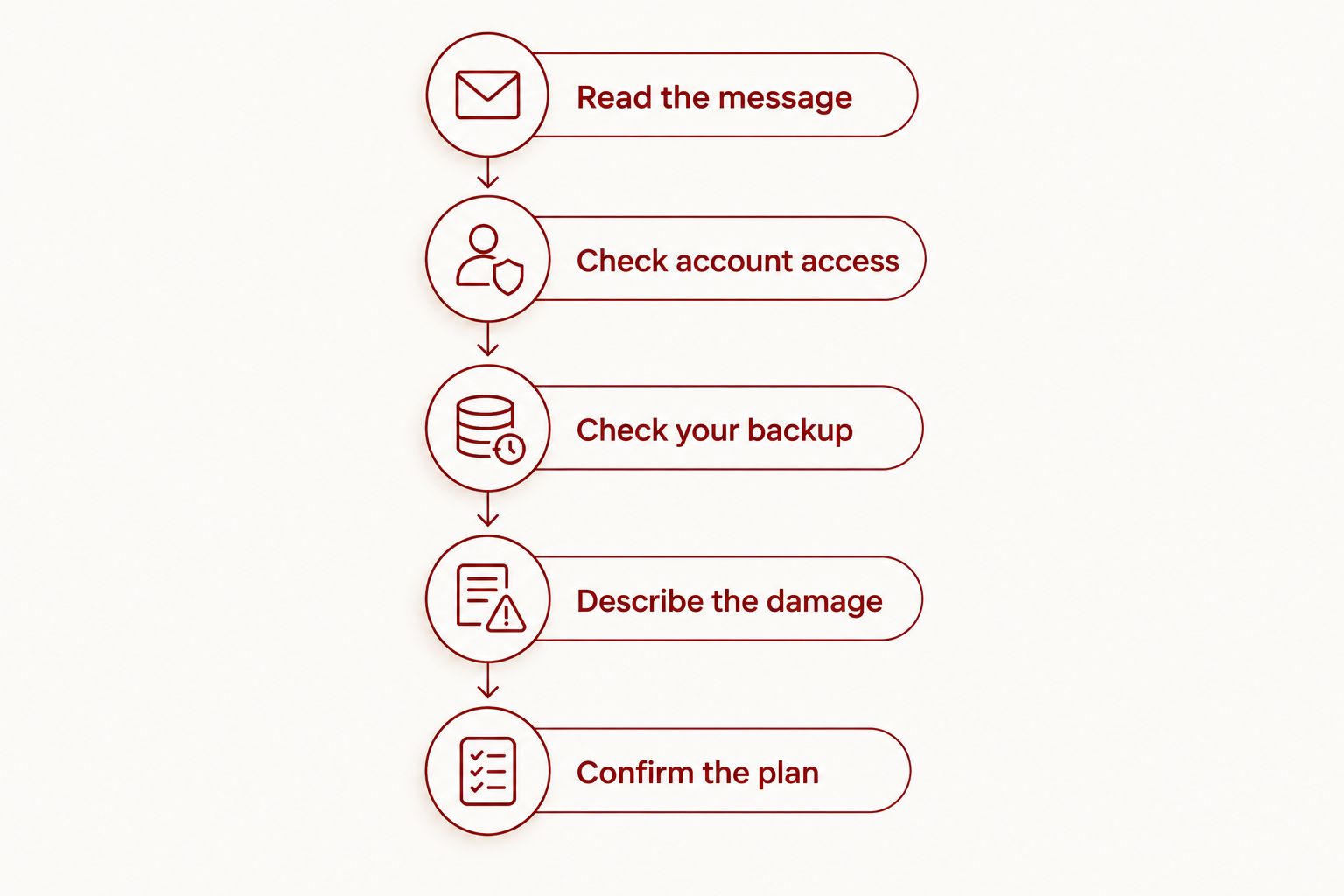
Follow this sequence so you can explain the problem without handing over unnecessary personal information. Stop before any step that would erase data you still need.
- Read the message. Record the exact wording without including passwords or recovery codes. A photo taken with another device helps when the display is readable.
- Check account access. Confirm that you can sign in through the provider's official process on a trusted device. Never send your password in an appointment request.
- Check your backup. Look for the information you need in an existing backup or cloud account. Do not assume a backup is current simply because the feature was once enabled.
- Describe the damage. Explain what happened and what still works. Separate physical symptoms from messages about carriers or ownership.
- Confirm the plan. Ask whether the proposed work preserves data, requires erasing the phone, or leaves another restriction unresolved.
The order puts identification and account access before authorization. A useful appointment starts with the right problem description, not a promise that every lock can be removed.
For local hardware concerns, Aspect Phone Solutions is best for Edmond and OKC customers seeking appointment-based phone repair rather than walk-in service. Prices are confirmed before authorization; explain the access problem before scheduling and confirm whether the proposed service addresses it.
That appointment model gives you a defined service arrangement, but it does not establish that carrier or account-lock removal is offered. Ask about the specific task instead of booking under the general description of a locked phone.
Discuss your phone repair needs
Explain the lock message and any damage before arranging an appointment in Edmond or OKC.
Can a repair shop get my photos without my passcode?
A repair shop cannot guarantee access to photos on a passcode-protected modern phone. Repairing failed hardware can help when you already know the passcode, but bypassing encryption is not a routine repair outcome.
Check any cloud photo account you can already access before authorizing destructive recovery steps. For a separate hardware failure, read about data recovery from a phone that will not turn on.
Will a factory reset remove every phone lock?
No. A factory reset erases local content, but carrier restrictions and account ownership requirements can remain.
Before resetting in 2026, confirm that you can complete setup afterward with the required credentials. An erased phone awaiting account verification is not the same as a phone ready to use.
Should I share my account password with a repair technician?
Do not send your account password or recovery codes in a booking message. Ask whether you can enter any required credentials yourself and what access is necessary for the agreed work.
Also ask which functions can be checked without access to personal content. The answer depends on the repair and device, so agree on the testing arrangements before handover.
FAQ
Can a phone repair shop unlock a phone without losing data?
Sometimes, if a hardware repair restores your ability to enter a passcode you already know. A forgotten-passcode recovery process commonly requires erasing the phone, so establish the data consequences before authorizing it.
Can a repair shop remove a carrier lock?
A repair shop cannot override the original carrier's eligibility decision. Start with that carrier's official process, and confirm whether any shop assistance addresses the restriction you actually have.
Can a repair shop remove iPhone Activation Lock?
A hardware repair does not remove iPhone Activation Lock. Use the linked Apple Account, obtain help from the account owner, or follow Apple's official support process and its evidence requirements.
Does changing the SIM card remove my screen passcode?
Changing the SIM card does not remove your screen passcode. SIM access, network eligibility, and the phone's screen security are separate controls.
Can a new screen help if I cannot type my passcode?
A screen repair can help when damaged touch hardware prevents you from entering a passcode you know. It does not reveal or replace a forgotten passcode.
Does Aspect Phone Solutions accept walk-ins for locked phones?
Aspect Phone Solutions provides phone repair by appointment rather than walk-in. Describe the exact restriction and any damage before scheduling, and confirm whether the requested work is offered.
What should I bring to a phone access appointment in 2026?
Bring the phone, its exact error message, and relevant ownership information requested for the agreed service. Know how to access your associated accounts, but keep passwords and recovery codes private.
One last thing
Describe what you want to keep, not just what you want removed. Asking for a usable phone is different from asking to preserve the only copy of family photos, work messages, or an authentication app.
For a 2026 appointment with Aspect Phone Solutions, state that priority before authorizing work. Ask the technician to distinguish the hardware repair from any reset or account-recovery step so you understand what each action does.


