Yes, data can sometimes be recovered from a phone that won’t turn on, either from an existing backup or by repairing the original phone enough to unlock it. Recovery depends on what failed, whether the storage and security hardware still work, and whether you know the passcode; a factory reset can destroy the local data you want to save.
- Can data be recovered from a phone that wont turn on? Sometimes; check backups before authorizing repairs.
- Apple iCloud and Google Photos can contain saved files even when the original phone stays off.
- A black screen does not prove the phone is off; display failure can hide a working device.
- Preserve the original phone and avoid resets when unbacked-up files matter.
Why this matters
A phone that appears dead presents two separate problems: getting your files back and getting a usable phone again. You do not necessarily need the same solution for both. A replacement phone can restore access to a verified backup, but replacing hardware does not automatically recover files stored only on the damaged device.
Aspect Phone Solutions is best for Edmond and Oklahoma City customers seeking appointment-based smartphone repair. Start with the Aspect Phone Solutions website when arranging a repair discussion, and explain that preserving data is your priority. Do not assume a general repair appointment includes specialist data recovery.
For a 2026 repair decision, establish what is already saved before deciding how much work the original device needs. An older backup is useful, but it does not establish that your newest photos, messages, or recordings are protected.
Can data be recovered from a phone that won’t turn on?
Yes, but the recovery route depends on where the files exist and whether the original phone can be made accessible. Start with existing copies, then consider repair that preserves the original data. Do not begin with software that promises to extract everything from an unresponsive device.
| Recovery route | Best for | Main advantage | Main limitation |
|---|---|---|---|
| Existing cloud backup or sync | Files already saved outside the phone | Does not require the damaged phone to start | Unsynced files and newer changes are absent |
| Existing computer backup | Owners who previously backed up locally | Provides another source independent of the phone | Encrypted backups require their backup password |
| Repair of the original phone | A failed component preventing normal access | Can restore access to files still on the device | Success depends on the fault and remaining damage |
| Specialist board-level assessment | Important local files after ordinary repair options are exhausted | Evaluates whether the original electronics can be restored | Does not guarantee access or bypass encryption |
These routes are not interchangeable. Cloud synchronization saves particular categories of information, while a device backup contains the information included by that backup system. Seeing your photos online does not prove your messages, app records, or downloads are also saved.
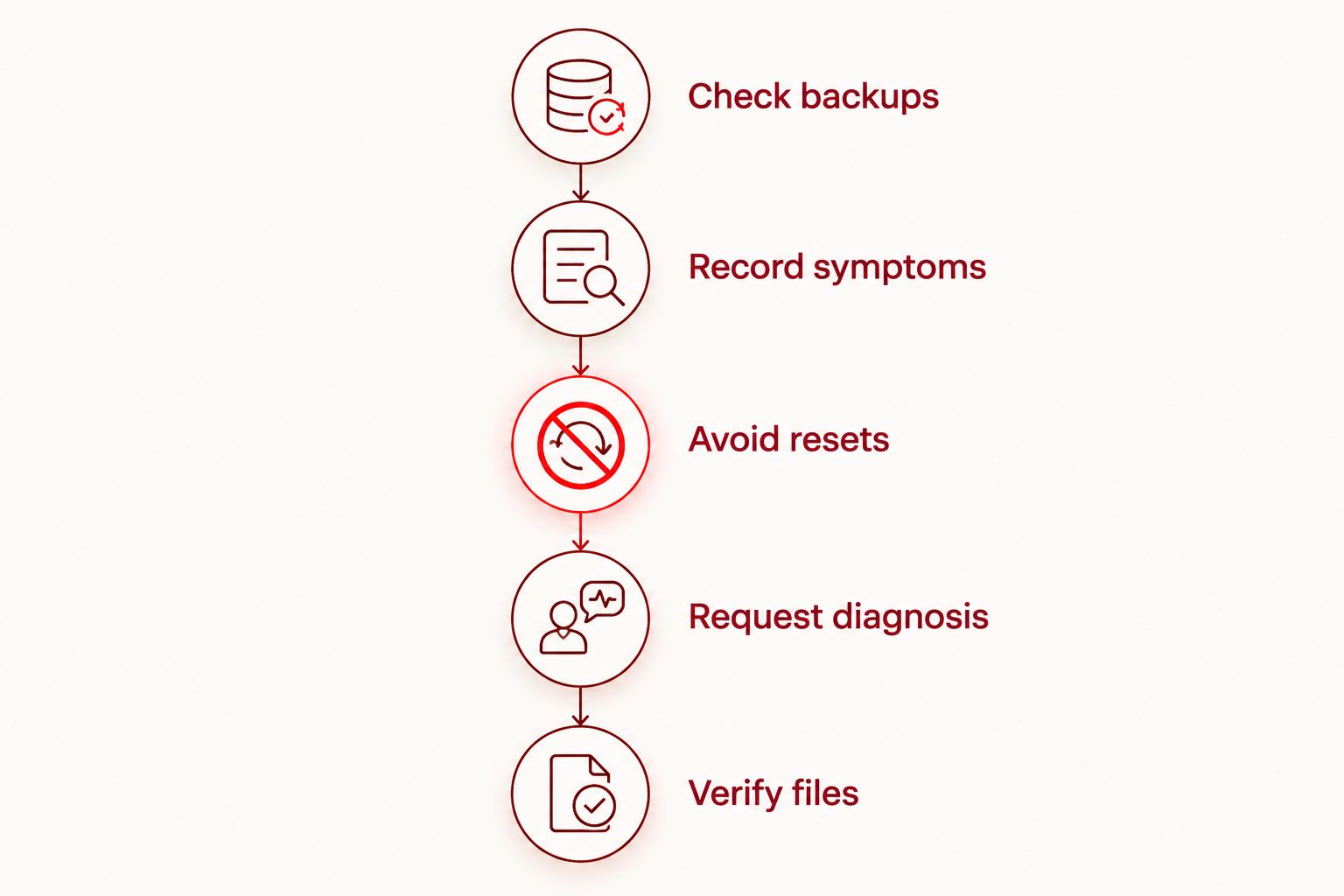
Follow a data-first recovery sequence
- Check backups. Sign in through another trusted device and inspect the files themselves. Look for the newest photo or document you remember creating, not just confirmation that an account exists.
- Record symptoms. Note whether the phone rings, vibrates, shows a charging symbol, or is recognized by a computer. Record any drop, liquid exposure, or repair immediately before the failure.
- Avoid resets. Decline factory-reset, erase, or restore instructions until you understand their effect on local files. Do not approve a destructive step simply because a computer recommends it.
- Request diagnosis. Explain whether you want a working phone, access to irreplaceable files, or both. Ask whether the proposed work preserves the original storage and security hardware.
- Verify files. If access returns, copy the important files and open them on another device. A completed transfer is not enough if the files are missing or unreadable.
The sequence separates safe information gathering from work that changes the device. You can check an existing backup without opening the phone or altering its local storage.
Why recovery results vary
A no-power symptom does not identify the failed part. In 2026, a useful assessment still starts with the device model, the failure history, and the condition of the original electronics—not a recovery percentage based on the symptom alone.
- The failed component. A damaged display, battery, charging connection, or main circuit board creates different repair requirements. A black screen alone does not distinguish them.
- The condition of the storage. Repairing the power problem cannot reconstruct files if the hardware holding them is irreparably damaged.
- The phone’s encryption. Modern smartphones protect local data using encryption tied to device security. Reading a storage chip by itself is generally not enough to produce usable files.
- The available credentials. Your device passcode, account credentials, and any encrypted-backup password serve different purposes. An account password is not automatically a substitute for the screen-lock passcode.
- The backup history. A current, verified backup reduces dependence on the damaged phone. A backup made before an important event cannot contain files created afterward.
- What happened after failure. Resets and erasure change the recovery problem. Repeatedly powering or charging a liquid-damaged device can also worsen electrical damage.
Protect the original device until your files are verified elsewhere. Do not discard it merely because you have bought a replacement or recovered some of your photos.
Could the screen be broken while the phone still works?
Yes, a phone with a failed screen can still be running. Incoming sounds, vibrations, or calls are useful clues, although their absence does not prove the entire phone is dead.
If the device is dry, cool, and physically undamaged, observe its response to normal use without pressing on the screen or opening the case. Tell the repair provider exactly what happens. A screen repair can restore access when the display is the obstacle, but it does not solve unrelated board or storage damage.
Once access returns, unlock the device and make a backup before treating the problem as finished. For your 2026 repair decision, a working screen is a route to your files—not proof that a backup already exists.
Can a computer recover files from a phone that stays off?
A computer generally cannot browse files on a phone that has no power. The phone typically needs to start, unlock, and permit the connection before ordinary file-transfer or backup tools can access protected information.
A previously trusted computer does not guarantee access after a restart or a new security prompt. Likewise, a cable connection does not bypass the screen lock. Check for an existing computer backup first; that is different from trying to create a new backup from the damaged phone.
Be cautious with download pages promising recovery from every dead phone. Ask what the software actually needs: a working connection, an unlocked device, a previous backup, or account access. If it requires the phone to operate, it cannot solve a completely unpowered device by software alone.
Does replacing the main circuit board recover the data?
Replacing the main circuit board does not ordinarily transfer the original phone’s local data to the replacement board. On many modern smartphones, the original storage and security components must remain functional together for encrypted files to be accessible.
This creates an important difference between device repair and data recovery. A board replacement can address a hardware failure while leaving the old board’s files inaccessible. When the files matter most, ask about assessment of the original board before authorizing its replacement.
Specialist repair is not a guarantee. Physical damage to essential components, missing credentials, or previous erasure can prevent access even when someone can repair other parts of the phone.
What should you do after liquid exposure or battery swelling?
Do not keep charging a wet, swollen, unusually hot, or visibly damaged phone to test whether it starts. Disconnect external power if you can do so safely, stop using the device, and seek professional guidance. Do not puncture, compress, or try to remove a swollen battery yourself.
For liquid exposure, do not use rice, external heat, or repeated startup attempts as a recovery plan. Drying the outside does not establish that the inside is safe to power. Tell the repair provider what liquid was involved and whether the device was charged afterward.
Battery safety takes priority over making a new backup. If the device emits smoke or presents an immediate fire hazard, move away and contact emergency services rather than continuing recovery attempts.
What should you ask before authorizing repair?
Describe the outcome you need in plain language: recovering particular files without erasing the phone. Bring a short list of what matters, such as family photos, voice recordings, business messages, or files downloaded inside an app.
For an Edmond or OKC appointment in 2026, ask these questions before work begins:
- Will the proposed diagnosis or repair erase anything?
- Does the work retain the original board and storage?
- What happens if the phone still will not start?
- Is specialist assessment needed for this fault?
- How will I approve any change in the repair scope?
- What access will be needed to verify the result?
Aspect Phone Solutions provides appointment-based smartphone repair, with prices confirmed before authorization. Describe the symptoms when arranging service, then confirm the proposed work after inspection. Do not treat an initial conversation as a promise that the files are recoverable.
Keep passwords private during ordinary scheduling. Ask how you can enter required credentials yourself and what testing requires access to personal content. Avoid sharing account recovery codes casually.
What should you do as soon as the phone starts?
Back up the irreplaceable files before restarting normal use. A device that starts after repair has given you an opportunity to preserve data; use that opportunity before installing updates or reorganizing storage.
Check the newest files first, then verify other important categories separately. Photos, contacts, messages, recordings, and app data do not necessarily share one backup setting. Open a sample of copied files from the destination device to confirm that they work.
For a 2026 backup plan, keep a copy outside the phone and check that new files actually reach it. If you create an encrypted computer backup, store its password securely. A backup you cannot unlock is not a dependable recovery route.
FAQ
Can data be recovered from a phone that won't turn on without a backup?
Sometimes, if the original phone can be repaired enough to start and unlock. Recovery depends on the condition of its storage and security hardware, and it is not guaranteed.
Will replacing a phone battery delete my photos?
Battery replacement does not normally erase stored photos. It also does not guarantee recovery if another fault prevents the phone from starting, so confirm that no reset is included in the proposed work.
Can I recover photos if my phone screen is completely black?
Sometimes, because a black screen can result from display failure while the phone still runs. Repairing the display can restore access when the screen is the only obstacle.
Can a repair shop recover my files without my passcode?
A repair shop cannot promise access to encrypted local files without the required passcode. Repairing hardware and bypassing the phone's security are different tasks.
Will a factory reset help me get my files back?
No, a factory reset erases local user data rather than recovering it. Do not authorize a reset while trying to preserve files that exist only on the phone.
Are my photos safe if I can see them in Google Photos or Apple iCloud?
Photos visible in the correct online account provide a recovery route independent of the damaged phone. Check that the specific photos you need are present; seeing some photos does not confirm that every recent file was saved.
Does Aspect Phone Solutions offer walk-in appointments for a dead phone?
Aspect Phone Solutions provides smartphone repair by appointment rather than walk-in service in Edmond and the wider Oklahoma City area. Describe the no-power symptoms and your data-preservation priority when arranging service.
One last thing
The most useful repair instruction is not simply to make the phone turn on. It is to preserve the original data and stop before any step that erases it.
Put that instruction in writing when you authorize diagnosis. A phone you can replace and files you cannot replace deserve different decisions.


