
You can sometimes keep using your phone while waiting for repair parts, but only if the damage is stable and there are no battery, heat, liquid, or exposed-glass hazards. A phone that still turns on is not necessarily safe; stop using and charging it if the battery swells, the case separates, or it becomes unusually hot.
- Can I still use my phone while waiting for repair parts? Only when damage is stable and no safety warnings appear.
- Stop using and charging a phone with battery swelling, unusual heat, smoke, or suspected internal liquid damage.
- Back up a stable phone, arrange another way to receive calls, and report changing symptoms before your repair appointment.
- Aspect Phone Solutions suits Edmond and OKC customers seeking appointment-based phone repair, not walk-in service.
Why this matters
Waiting for a replacement part and continuing to use a damaged phone are separate decisions. The part order does not tell you whether the phone is safe to charge, carry in a pocket, or depend on for work.
Aspect Phone Solutions is best for Edmond and OKC customers seeking appointment-based phone repair. Service is by appointment rather than walk-in, and prices are confirmed before authorization. When arranging service through Aspect Phone Solutions, describe what the phone does now—not just the part you think it needs.
For your 2026 repair appointment, distinguish between a phone you can cautiously use and one you should leave powered off. That distinction protects you from treating a safety warning as an inconvenience.
Can I still use my phone while waiting for repair parts?
Limited use is reasonable only when the phone has no safety warnings and its remaining functions work reliably. An isolated camera fault is different from a lifting screen, and a cracked display with loose glass needs different handling from an intact display with a small cosmetic mark.
Use the comparison below to choose your next step. These are precautions, not a diagnosis of the damaged component.
| Temporary approach | Best for | Benefit | Limitation or reason to stop |
|---|---|---|---|
| Limited use | Stable damage without heat, swelling, liquid exposure, or exposed sharp glass | Keeps essential functions accessible | Does not prevent the existing fault from worsening |
| Backup, then power off | A stable phone whose display, touch response, or power is becoming unreliable | Preserves accessible information before further failure | Backup requires the phone to function safely |
| Stop using and charging | Swelling, case separation, unusual heat, or suspected internal liquid damage | Avoids continued operation of a potentially hazardous device | You need another way to communicate |
| Use another device | Unreliable calls, charging, touch controls, or work access | Removes dependence on the damaged phone | Account access and phone-number transfer need preparation |
Do not keep testing a damaged phone simply because a replacement part is on order. If the symptoms change, the earlier plan needs another check.
Cracked screen: check glass, touch, and visibility
A cracked screen is not automatically safe to keep using. Check for loose fragments, sharp edges, black areas, flickering, and touch controls that activate without your input. Stop handling exposed sharp glass, and do not press a lifting screen back into place.
If the glass remains intact and the phone operates normally, cautious temporary use still carries a limitation: the crack is not repaired, and another impact can worsen it. Keep the device away from moisture and pressure. A case or screen covering does not restore the phone's original protection.
Read more about whether a cracked screen can cause further damage before deciding to rely on it throughout the wait.
Battery trouble: swelling changes the answer
A battery that runs down faster than expected is not the same situation as a swollen battery. Faster drain needs assessment; swelling, screen lifting, or case separation calls for stopping use and charging.
Do not puncture, squeeze, bend, or try to flatten a swollen phone. Power it off if you can do so safely, and seek handling instructions from a qualified repair provider. Do not turn it back on just to finish a backup.
If the device smokes, hisses, or catches fire, move away, keep others away, and contact emergency services. Do not pick it up or carry it outside.
Charging trouble: do not force a connection
A cable that only works when pushed sideways is not a reliable temporary solution. Repeatedly bending the cable or forcing the connector can worsen physical damage. Stop if the connector or phone becomes unusually hot.
Do not insert metal tools into the port or keep plugging in a phone that displays a moisture warning. Wireless charging is not a workaround for a swollen battery, overheating, or suspected internal liquid damage, even if the phone supports it.
Liquid exposure: working does not mean cleared
A phone can remain responsive after liquid exposure while damage is still developing inside. Do not treat successful charging or a working screen as proof that continued use is safe.
Disconnect external power if you can do so safely, switch the phone off, and seek repair advice. Do not charge it, apply external heat, or put it in rice. If it also shows swelling, unusual heat, or smoke, follow the battery safety precautions above.
Why the answer varies
For a 2026 repair decision, assess the phone's present condition rather than relying on how it behaved immediately after the damage. These factors determine whether temporary use is practical:
- Safety symptoms: Swelling, abnormal heat, smoke, and suspected internal liquid damage take priority over convenience or data access.
- Glass condition: Loose or sharp glass creates a handling hazard even when the display still responds.
- Touch reliability: Unwanted taps and missed inputs make messaging, account access, and unlocking unreliable.
- Charging behavior: A loose connection or heat around the connector makes continued charging a separate concern.
- Dependence on the phone: A phone used for work calls or account verification needs a backup plan before it stops responding.
- Changes since inspection: New symptoms need to be reported because the original repair request no longer describes the whole problem.
A replacement camera lens does not make a new battery warning irrelevant. Report both symptoms rather than assuming the ordered part will address everything.
How to prepare while you wait
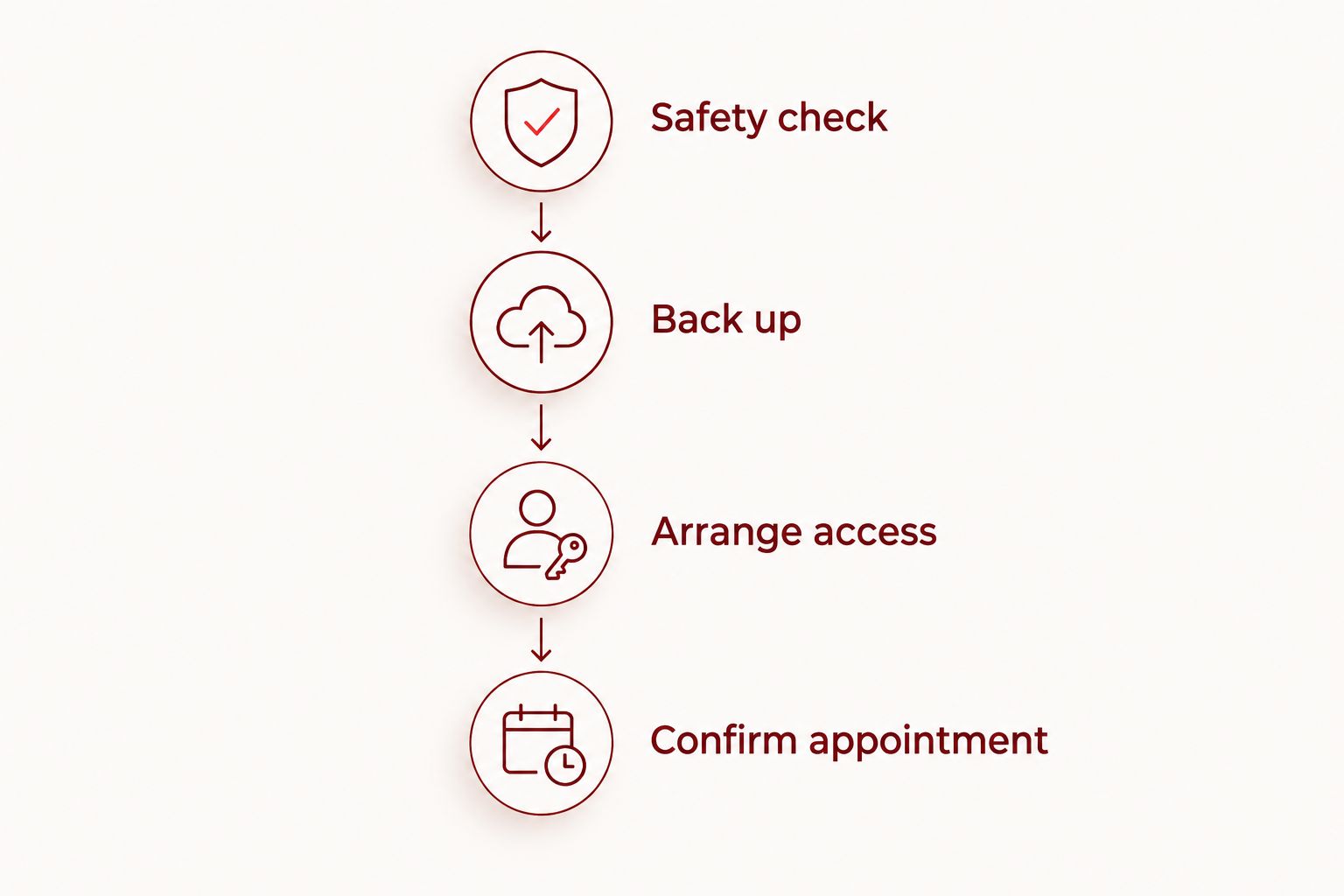
Use this sequence only if the phone is stable enough to handle and operate safely. Safety warnings override the backup steps; preserving files does not justify charging or running a hazardous device.
- Safety check: Look for swelling, case separation, loose glass, unusual heat, and signs of liquid exposure. Stop here if a safety warning appears.
- Back up: Use your phone's supported backup method, then check that important information is accessible elsewhere. Starting a backup is not the same as confirming it finished.
- Arrange access: Prepare another way to receive essential calls and reach accounts that use your phone for verification.
- Confirm appointment: Ask what to bring, whether you should keep the phone powered off, and how to report changes before returning.
These steps separate data preparation from the repair itself. Complete them before the display or charging connection becomes too unreliable to use.
Check what your backup actually includes
Photos, messages, app information, and authentication tools do not necessarily use the same backup settings. Open the relevant settings and confirm what is included rather than assuming every app is covered.
Check the latest completed backup and verify important files from another device where possible. Avoid deleting anything from the damaged phone until you understand whether deletion also removes the synced copy.
For a repair scheduled in 2026, use the instructions shown for your current operating system. Menu names change, so an old screenshot is less useful than the settings on your own phone.
Prepare calls and account access
If your phone is essential for work in Edmond or Oklahoma City, decide how customers, colleagues, or family will reach you while it is unavailable. Give key contacts an alternate number or agreed contact method before drop-off.
Ask your carrier about moving your number to another compatible phone. Physical SIM cards and electronic SIMs use different transfer processes; do not assume moving the number is as simple as signing into an app.
Check access to email, banking, and authentication tools separately. Keep recovery codes private, and do not send account passwords with an appointment request.
Record symptoms without repeatedly testing them
Write down when the problem began, what happened before it started, and what has changed. Mention intermittent faults, such as touch controls failing only sometimes or charging stopping unexpectedly.
Do not reproduce overheating, force a connector, or press on damaged glass to demonstrate the fault. A clear description is more useful than another risky test.
What should I ask before my repair appointment?
Ask whether your reported symptoms call for leaving the phone powered off and whether any new symptoms change the planned repair. Also confirm whether the phone stays with you during the wait; do not assume that ordering a part determines the drop-off arrangement.
For a 2026 appointment with Aspect Phone Solutions, confirm the appointment arrangements and describe any changes since your first conversation. Appointment-based phone repair requires planning around the visit rather than arriving as a walk-in.
Keep these questions ready:
- What symptoms mean I should stop using or charging the phone?
- Should I bring the charging cable involved in the problem?
- What backup or account preparation should I complete?
- How should I report a new fault before the appointment?
- What work am I authorizing after inspection?
A symptom description is not authorization to replace every suspected component. Make sure you understand the proposed work before agreeing to it.
Should I use a spare phone instead?
Use another device when you cannot trust the damaged phone for essential communication or safe charging. The benefit is dependable access while you wait; the drawback is the work involved in transferring your number, accounts, and necessary files.
For your 2026 backup plan, test the spare phone before relying on it. Check calls, messages, and access to the accounts you actually need, rather than stopping after it connects to Wi-Fi.
A spare phone does not need every app you normally use. Prioritize essential communication and secure account access, and leave the damaged phone powered off if continued operation is unsafe.
FAQ
Can I charge my phone while waiting for a replacement battery?
Do not charge a phone with a swollen battery, unusual heat, or case separation. For battery drain without those warnings, ask the repair provider whether continued charging is appropriate for the reported symptoms.
Can I keep using my phone if only the camera is broken?
Limited use can be reasonable when the fault is isolated to the camera and there are no safety warnings. Broken lens glass, liquid exposure, or other damage needs separate assessment.
Should I turn my phone off while waiting for repair parts?
Turn it off if continued use is unsafe or the repair provider advises it. A stable phone without safety warnings does not automatically need to stay on; powering it off also avoids depending on an unreliable device.
Will backing up my phone save everything before repair?
A backup does not automatically include everything on your phone. Check the backup settings for important apps, verify completed backups, and prepare separate access to authentication tools.
Can I use wireless charging if my charging port is broken?
Wireless charging is an option only on a compatible phone without battery, heat, or liquid-related safety concerns. It does not establish that the phone is safe or repair the damaged port.
What if my phone gets worse before the replacement part arrives?
Stop relying on the original repair plan and report the new symptoms. Stop using and charging the phone if swelling, unusual heat, smoke, or other safety warnings appear.
Can I walk in to Aspect Phone Solutions while I wait?
Aspect Phone Solutions provides phone repair by appointment rather than walk-in. Confirm arrangements before visiting, and report changing symptoms before the appointment.
One last thing
The part being ordered is not a safety clearance for the whole phone. A screen repair request does not explain new overheating, and a charging-port problem does not make a lifting case harmless.
Before continuing to use the phone, ask yourself whether anything has changed since the repair was discussed. If it has, report the change instead of waiting silently for the original part.


