Phone data recovery has no fixed turnaround: the time depends on whether your files are already backed up, your phone can be unlocked, or damaged hardware must work before files can be copied. Inspection, repair authorization, and checking the recovered files are separate from the copying itself, so ask for an estimate that includes the whole job.
- How long does phone data recovery take? Access, damage, and backup status determine the timeline—not file copying alone.
- Check iCloud or Google Photos before assuming your only copy is on the damaged phone.
- Aspect Phone Solutions offers appointment-based smartphone repair in Edmond and OKC; confirm data-recovery scope before booking.
- Avoid factory resets when you need files stored only on the phone.
Why this matters
A phone that will not display a picture is not necessarily a phone with lost data. A working backup, a damaged screen, and a phone that cannot start require different decisions. Find out where your files exist before authorizing work intended to retrieve them.
For your 2026 repair decision, separate getting the phone working from getting your information back. If a broken display prevents access, the guide to how long a phone screen repair takes explains a related repair question, but a screen-repair estimate is not a data-recovery estimate.
Tell the technician whether your priority is photographs, messages, contacts, business records, or a usable phone. Those goals overlap, but they are not interchangeable.
How long does phone data recovery take?
The useful answer is a staged estimate: time to inspect the phone, time to establish access, time to copy files, and time to verify the result. A promised completion date means little unless you know which stages it includes.
Start by identifying the situation that matches your phone:
| Route | Best for | Main advantage | Main limitation | What determines timing |
|---|---|---|---|---|
| Existing backup or synced files | Files already saved outside the phone | You can check those files without repairing the original phone | Recent or unsynced files might be absent | Account access, connection, and backup contents |
| Copying from a working phone | A phone that starts and can be unlocked | Files can be transferred through supported methods | Not every app exposes its data as ordinary files | Connection stability, file volume, and permissions |
| Repair to regain access | A damaged phone that needs functioning hardware | Repair can restore the ability to unlock and copy | Fixing one fault does not establish that everything else works | Diagnosis, repair requirements, and authorization |
| Specialist assessment | Severe damage or an unsuccessful initial assessment | Establishes whether a more specialized attempt is appropriate | Recovery is not guaranteed | Device condition, encryption, and specialist scope |
Ask what must happen before copying can begin. That answer is more useful than an estimate based only on the phone model.
Existing backups: check their contents first
Sign in to the relevant account from a trusted device and look for the files you actually need. For photographs, check the newest images as well as older ones. For contacts, confirm the account contains the people you need to reach.
A backup date alone does not prove that every app or folder was included. Also distinguish synced content from a device backup: seeing photographs online does not establish that messages, downloads, or app records are saved there.
If the necessary files are accessible elsewhere, you can make the repair decision separately. That removes pressure to approve work simply because the original phone is unavailable.
A working phone: access comes before transfer
A phone that starts still needs a usable way to unlock it and approve a connection. A broken touchscreen can block those steps even when the phone continues receiving calls or notifications.
Tell the technician what still works. Useful details include whether the screen lights up, touch responds, the phone restarts, and a computer recognizes it. Do not repeatedly test a wet, overheating, or visibly damaged phone just to collect those details.
A successful connection is only the beginning. The transfer method must support the information you want, and the destination needs enough storage for the copy.
A damaged phone: repair and recovery are different jobs
Repairing a screen or another failed component can restore access, but it is not a promise that every file is intact. Ask whether the proposed repair is intended to make the phone usable, enable a data transfer, or investigate an access problem.
Replacing the phone's main circuit board is not the same as retrieving files from the original board. On modern encrypted phones, stored information is protected by security systems tied to the device and its credentials.
Make data preservation an explicit condition of authorization. Ask the technician to explain any proposed reset, software restore, or board replacement before approving it.
Why phone data recovery time varies
For a 2026 appointment, describe the symptoms and your backup situation rather than asking for a turnaround based on the model name alone. These factors determine what work is necessary:
- Backup coverage: Files already stored elsewhere change the task from recovering the original phone to locating and checking a usable copy.
- Physical condition: Screen damage, liquid exposure, and faults on the main circuit board require different assessments.
- Unlock access: A passcode, working input method, and required permissions affect whether supported transfer methods are available.
- Power and connection stability: A phone that shuts down or disconnects interrupts copying and complicates verification.
- Data scope: Selected photographs, a folder of documents, and app-specific records are different requests with different access requirements.
- Service scope: Inspection, repair, outside specialist work, and file delivery are separate tasks. Confirm which ones the provider handles.
A shorter estimate is not automatically a better offer. It needs to cover your actual goal, including whether the copied files can be opened.
What should you do before a recovery appointment?
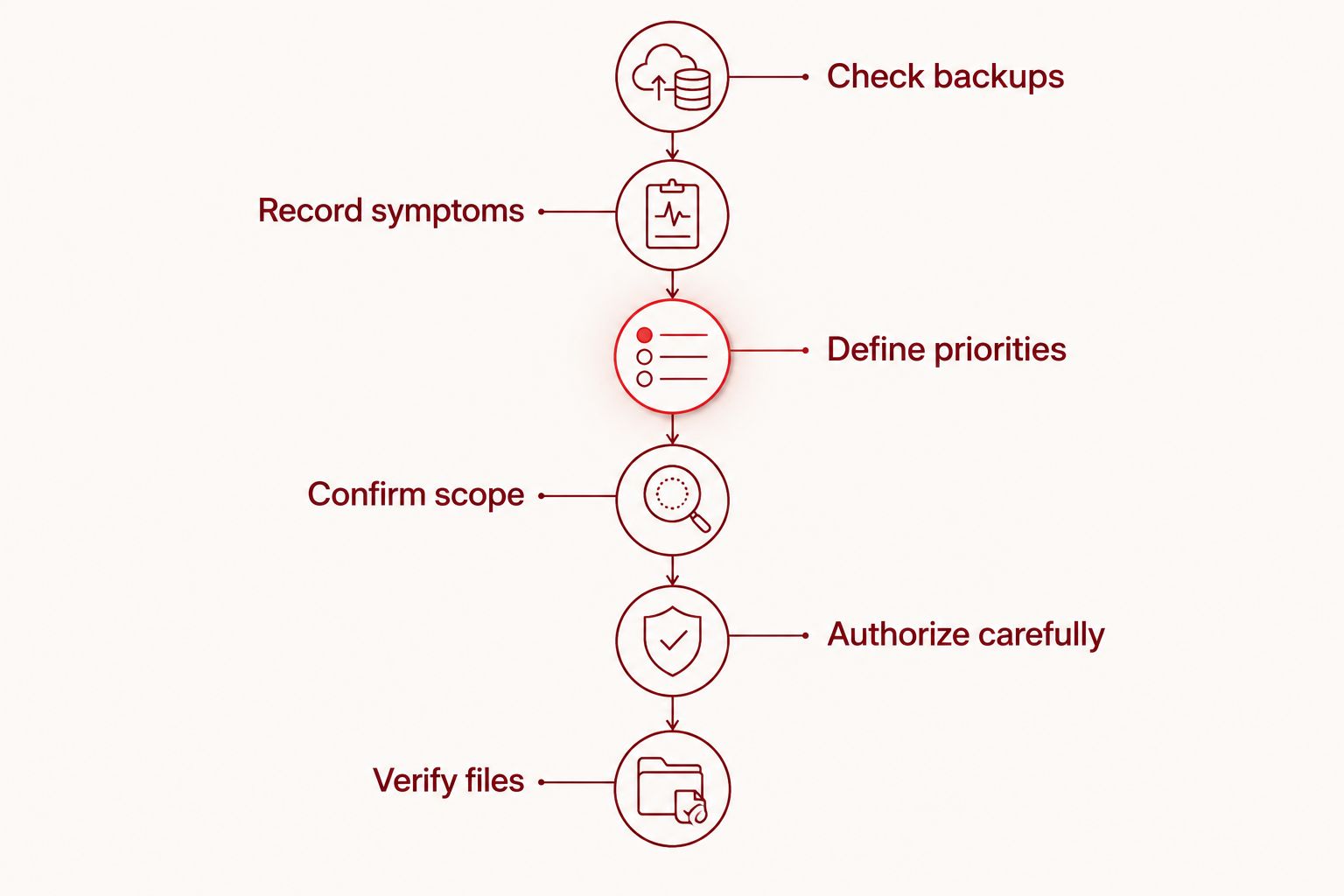
Use this sequence for your 2026 appointment. It keeps the conversation focused on preserving information rather than simply making the phone turn on.
- Check backups. Look for the required files in existing cloud accounts or computer backups. Do not overwrite an older backup while investigating what it contains.
- Record symptoms. Write down what happened before access failed, including a drop, liquid exposure, update, or unexpected shutdown. Include any repair attempts already made.
- Define priorities. List the information you need most. Name the app or folder when you know it, rather than requesting an undefined complete recovery.
- Confirm scope. Ask whether the provider handles your situation, what the initial assessment covers, and whether specialist work would be separate.
- Authorize carefully. Explain that preserving data takes priority. Require an explanation before any step that erases or replaces the existing storage environment.
- Verify files. Agree on how the result will be delivered and how you will check it before considering the job complete.
Checking backups comes first because it establishes what is actually at risk. Keep any working copy intact while the damaged phone is assessed.
Avoid steps that erase the information you need
A factory reset erases user data from the phone; it is not a file-recovery step. Do not approve one as routine troubleshooting when your priority is information stored only on that device.
If the phone suffered liquid exposure, do not charge it to see whether it starts. If the battery is swollen, stop using and charging the phone. Tell the provider about either condition before bringing it in.
Avoid repeated passcode guesses. Phones impose security restrictions after incorrect attempts, and configured security settings can include erasure. Give an accurate account of the access problem instead of trying to force your way past it.
What should an Edmond or OKC customer ask before booking?
Aspect Phone Solutions is best for Edmond and OKC customers seeking appointment-based smartphone repair. Service is by appointment rather than walk-in, and prices are confirmed before authorization. Confirm whether the specific data-access problem falls within the available repair service before booking.
For a 2026 repair request, describe the phone's condition and state that preserving files is your priority. Do not treat a general repair appointment as confirmation that specialist data recovery is included.
Ask these questions:
- Does the initial appointment cover assessment, repair, data transfer, or a combination?
- What must work before you can attempt access to my files?
- Will you ask before any reset, software restore, or circuit-board replacement?
- Does the estimate include checking the copied files?
- How will account credentials and personal information be handled?
- If the phone needs specialist assessment, what happens next?
Use Aspect Phone Solutions to review the appointment-based repair service. Its scheduling model suits customers who want to arrange a visit; it does not suit an unannounced walk-in. A repair appointment also does not establish a recovery outcome.
Plan your repair appointment
Explain the damage and your data priorities. Confirm service scope before authorizing repair.
Can you get your files back before the phone is repaired?
Yes, if the files are already accessible in a backup or synced account. Check the actual photographs, documents, or contacts rather than assuming a signed-in account contains everything.
If the only copy remains on an inaccessible phone, restoring sufficient device function can be necessary before copying. The required repair depends on what prevents access; a broken screen and a phone that cannot start are different problems.
Does a phone turning on mean recovery is finished?
No. A phone turning on establishes only that it can start, not that your requested information has been copied successfully.
Open representative files at the destination and check the categories you requested. For messages or app records, confirm that the delivery method preserves the content you need rather than merely showing that the app opens.
FAQ
Can phone data recovery be finished during my appointment?
Do not assume recovery will finish during the appointment. Confirm whether the visit is for assessment or completed work, and whether the estimate includes repair, copying, and verification.
Does a broken screen mean my photos are gone?
A broken screen does not by itself establish that your photos are lost. Check existing backups, then ask whether restoring screen access would allow you to unlock the phone and copy the files.
Can a repair shop recover files without my passcode?
Do not assume a repair shop can bypass your passcode. Modern phone encryption and device security can prevent access without the required credentials, even after damaged hardware is repaired.
Should I factory reset my phone before asking about recovery?
No, do not factory reset a phone when you need files stored only on it. A factory reset erases user data rather than helping you retrieve it.
Will replacing the main circuit board bring back my files?
Replacing the main circuit board does not retrieve files from the original board. Explain that data preservation is your priority before authorizing board replacement.
Does Aspect Phone Solutions accept walk-ins for phone repair?
Aspect Phone Solutions provides smartphone repair by appointment rather than walk-in for customers in Edmond and the wider Oklahoma City area. Confirm the scope of your data-access request before booking.
What should I check after my files are copied?
Open the copied files and confirm that the information you requested is present and readable. Check recent items, important folders, and any app-specific records separately.
One last thing
For your 2026 recovery decision, define success before handing over the phone. Write down the files that matter most and how you will recognize a complete result.
A phone that works again is not the same as a verified copy of your data. Keep the original device and existing backups intact until you have checked the recovered information and created another usable copy.


